
DOSI 0.1.13 + Datus Agent 0.4.3: Getting the Level of Detail Right
DOSI 0.1.13 adds level of detail calculations for governed metrics, while Datus Agent 0.4.3 brings DOSI into its workflow and adds SQL lineage analysis.
TL;DR
- DOSI 0.1.13 adds Level of Detail (LOD) calculations for questions that need more than one grouping level.
- LOD is defined through an Apache Ossie custom_extensions entry. DOSI understands and runs the Datus extension; LOD is not yet a portable Ossie core calculation.
- Datus Agent 0.4.3 uses DOSI directly for metric discovery, queries, attribution, and model validation. It also adds SQL lineage analysis to help map an unfamiliar project.
DOSI 0.1.13 and Datus Agent 0.4.3 are here. This release focuses on Level of Detail: making it clear whether a number is calculated per user, per order, per day, or at another level before it appears in an answer.
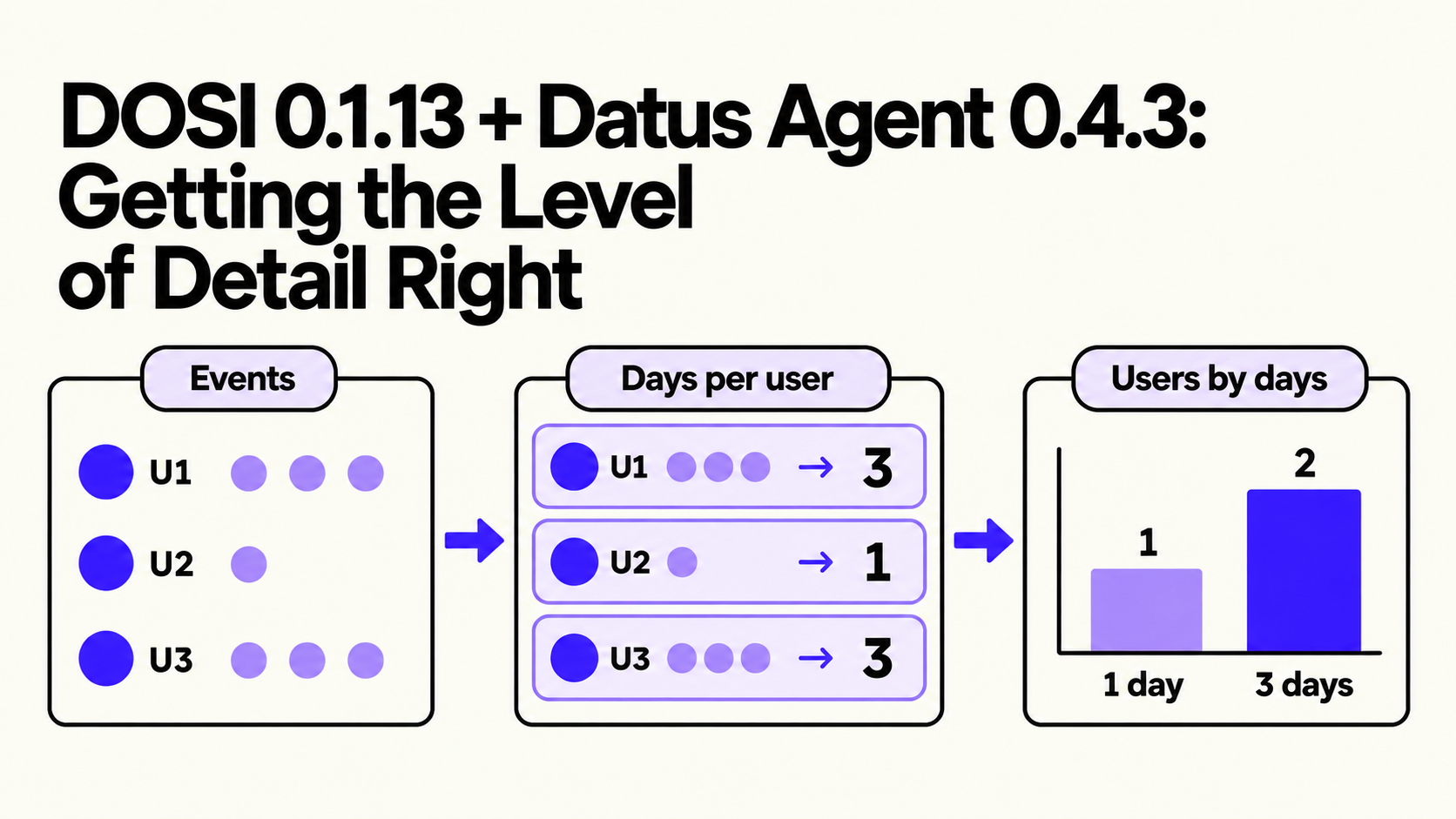
One question, two levels of detail
Suppose you ask, “How many users were active on exactly three days last month?”
First, count distinct active days per user. Then count users by active-day total. If you group session rows directly, you answer a different question.
The distinction is easy to miss because both steps use familiar aggregates. The first produces one active-day count for each user; the second counts users whose first result equals three. Counting session rows in the outer query would give extra weight to users with more sessions, while counting distinct users without the first step would lose the number of days. A correct answer depends on declaring the grain of the intermediate value, not merely choosing the right COUNT expression.
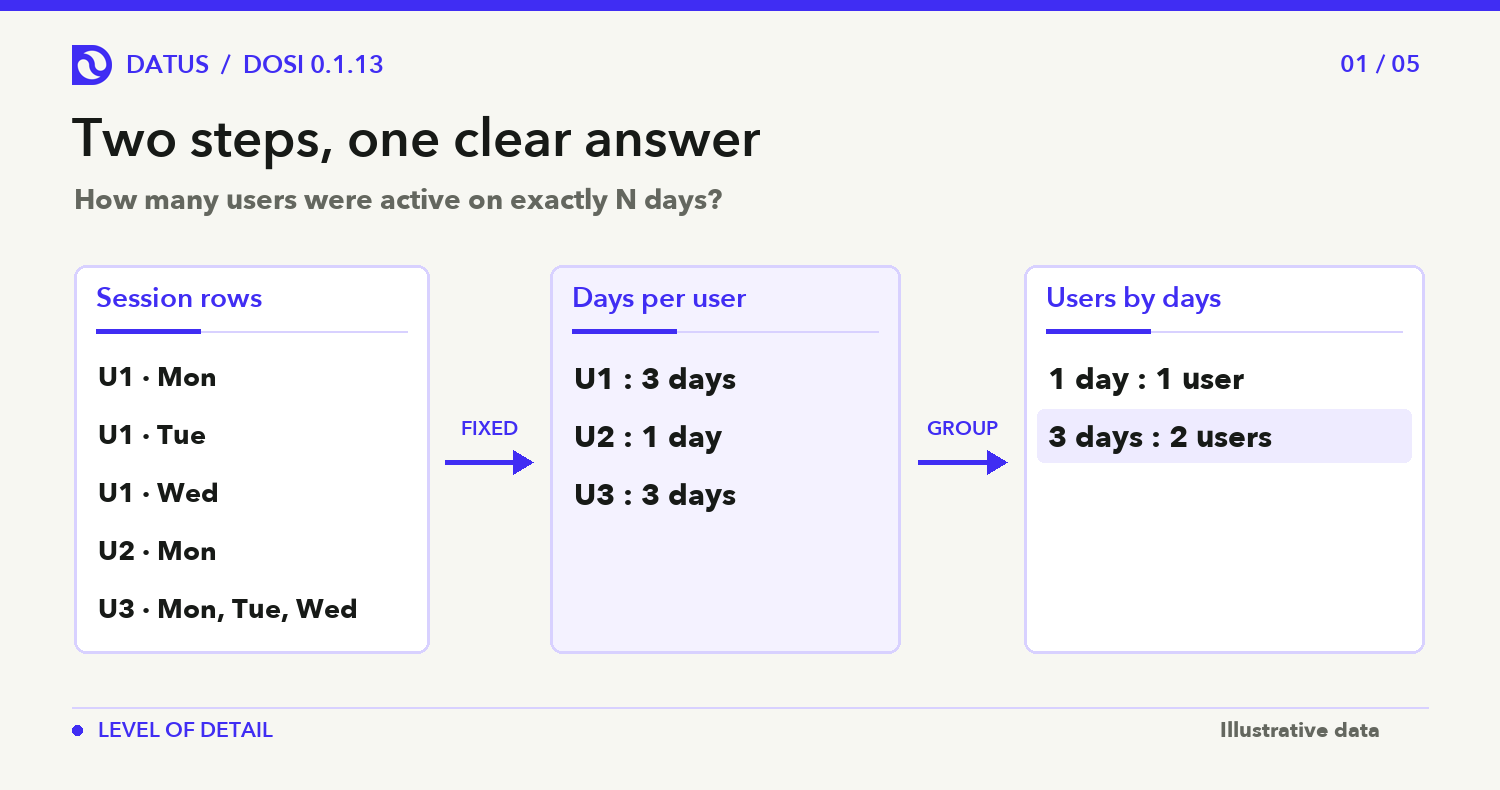
Example query using the sessions.active_day fixed field defined below:
{"metrics":["user_num"],"group_by":["sessions.active_day"],
 "where_sql":"sessions.active_day = 3",
 "time_range":{"start":"2026-09-01","end":"2026-10-01"}}
That change in grouping appears in everyday analysis. “Average revenue per customer by channel” needs a customer-level calculation before the channel average. “What share of total revenue came from this channel?” needs a channel number and a broader total. The question to settle is: what does each row represent when this number is calculated?
DOSI 0.1.13 lets a semantic model specify the answer. A fixed LOD field can calculate active days per user and make that result available for grouping or filtering. A metric can use include to calculate at a finer level than the final result, or exclude to bring in a broader total.
The channel examples use metric-level LODs. Assume revenue is SUM(orders.amount); include adds user_id before averaging, while exclude removes the view grouping for the share denominator.
metrics:
  - name: revenue_per_user
    expression: {dialects: [{dialect: ANSI_SQL, expression: "AVG(SUM(orders.amount))"}]}
    custom_extensions:
      - vendor_name: DATUS
        data: '{"v":"1.11","derive":{"type":"lod","expr":"avg(include(revenue, orders.user_id))"}}'
  - name: revenue_grand
    expression: {dialects: [{dialect: ANSI_SQL, expression: "SUM(SUM(orders.amount))"}]}
    custom_extensions:
      - vendor_name: DATUS
        data: '{"v":"1.11","derive":{"type":"lod","expr":"exclude(revenue)"}}'
  - name: revenue_share
    expression: {dialects: [{dialect: ANSI_SQL, expression: "SUM(orders.amount) / SUM(SUM(orders.amount))"}]}
    custom_extensions:
      - vendor_name: DATUS
        data: '{"v":"1.11","derive":{"type":"compose","expr":"revenue / revenue_grand"}}'
Query either metric by channel:
{"metrics":["revenue_per_user"],"group_by":["orders.channel_id"]}
{"metrics":["revenue_share"],"group_by":["orders.channel_id"]}
Where Apache Ossie ends and DOSI begins
Apache Ossie gives semantic models a shared structure for datasets, fields, metrics, relationships, and vendor extensions. Its core field definition describes a value on an individual row. It does not currently give an aggregate such as “active days per user” a standard LOD meaning when that aggregate is used as a field.
DOSI adds that meaning in a DATUS entry under Ossie’s custom_extensions. The model can still carry its Ossie definitions, while DOSI reads the extension and builds the extra aggregation step. The extension is understood by DOSI; another Ossie consumer does not necessarily produce the same LOD result. That distinction matters when sharing a model between tools.
For a team sharing one model with several consumers, this is a practical compatibility check. The core Ossie definitions remain useful as shared metadata, but the fixed LOD field needs a runtime that understands the DATUS extension. If a consumer ignores that extension, it cannot safely infer that the field represents a per-user rollup from its aggregate SQL alone. Test the exact question against each consumer before calling the result portable. That keeps the promise of an open model separate from the behavior of a particular execution engine.
Here is the relevant part of a DOSI model. The ordinary active_days metric counts dates. The active_day field then fixes that calculation per user_id, making its result available as a grouping value:
fields:
  - name: active_day
    expression:
      dialects:
        - dialect: ANSI_SQL
          expression: "COUNT(DISTINCT sessions.event_date)"
    custom_extensions:
      - vendor_name: DATUS
        data: '{"v":"1.11","requires":["lod"],"lod":{"expr":"fixed(active_days, sessions.user_id)"}}'
metrics:
  - name: active_days
    expression:
      dialects:
        - dialect: ANSI_SQL
          expression: "COUNT(DISTINCT sessions.event_date)"
  - name: user_num
    expression:
      dialects:
        - dialect: ANSI_SQL
          expression: "COUNT(DISTINCT sessions.user_id)"
A query can then request user_num grouped by sessions.active_day. DOSI first calculates each user’s active-day count, then counts users in each bucket. The SQL expression remains visible in the model; the lod extension tells DOSI at which level to calculate it.
Model-format note: These are focused excerpts, not complete model files. Every fixed(base, dims…) field needs a defined base metric backed by one plain aggregate; a parameterized filter metric can derive from that aggregate. The field’s expression must repeat the aggregate SQL. DOSI 0.1.13 loads the semantic_model: list format; check the document structure before copying a complete model from a newer Ossie draft.
More questions LOD can answer
A level of detail over another dataset. Imagine a flights table and a separate alerts table. A fixed field on each flight can count its open alerts using the relationship declared between them. Flights with no matching open alert get a count of zero, so “show flights with no open alerts” becomes a filter on that field. The calculation stays attached to each flight without multiplying flight rows by the number of alerts.
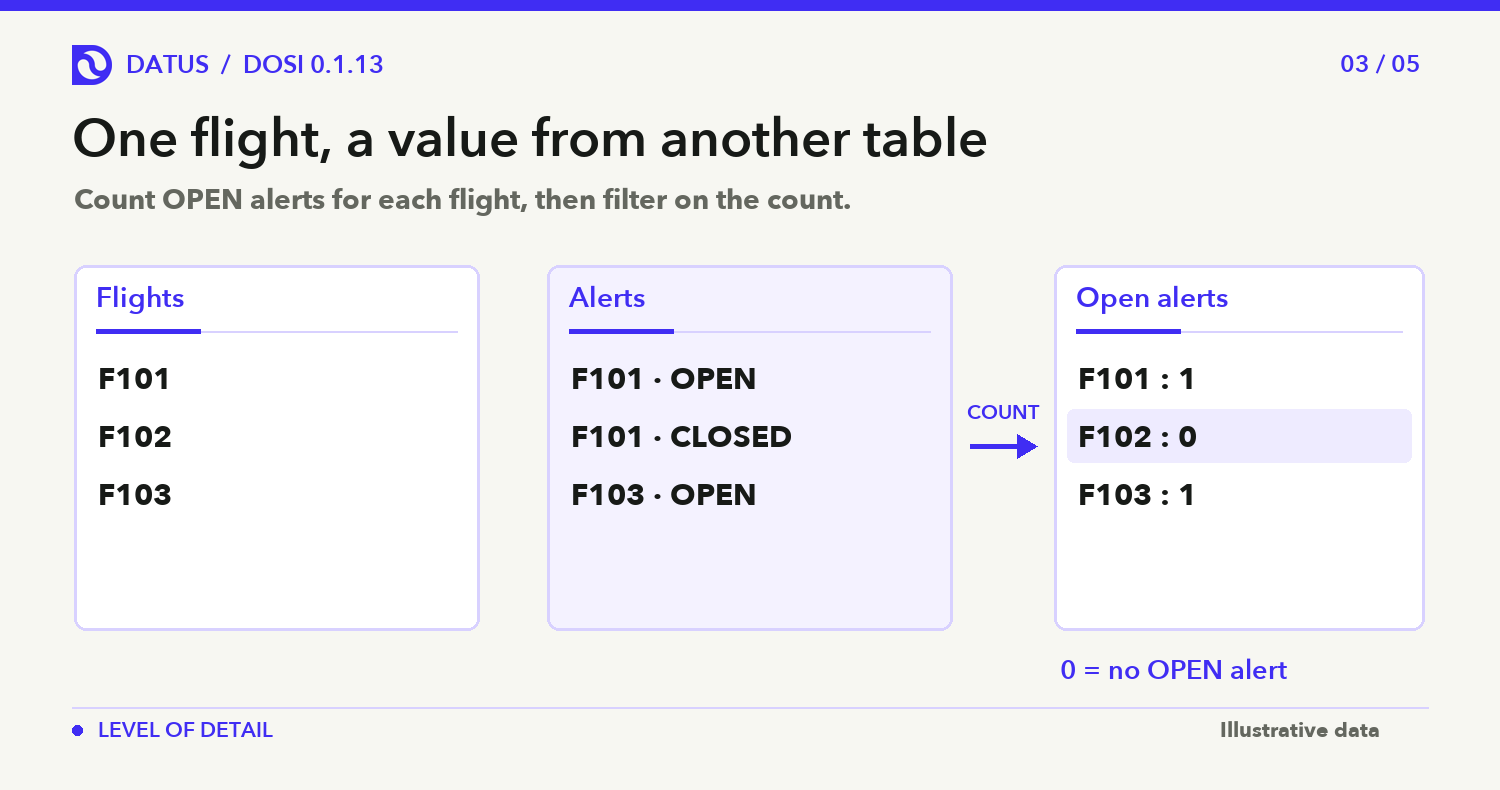
Model excerpt: the field lives on flights. Define open_alerts on flight_alerts with the same COUNT(CASE WHEN flight_alerts.status = ‘OPEN’ THEN flight_alerts.alert_id END) aggregate shown in the field; the relationship maps alerts to flights.
datasets:
  - name: flights
    fields:
      - name: open_alert_count
        expression: {dialects: [{dialect: ANSI_SQL, expression: "COUNT(CASE WHEN flight_alerts.status = 'OPEN' THEN flight_alerts.alert_id END)"}]}
        custom_extensions:
          - vendor_name: DATUS
            data: '{"v":"1.11","requires":["lod"],"lod":{"expr":"fixed(open_alerts, flights.flight_id)"}}'
relationships:
  - name: alerts_flight
    from: flight_alerts
    to: flights
    from_columns: [flight_id]
    to_columns: [flight_id]
List flights whose related rows contain no open alert:
dosi select --from flights \
  --fields flights.flight_id,flights.open_alert_count \
  --where "flights.open_alert_count = 0"
A level of detail with a window of its own. To find January active users who did not log in during February, first select the January users. Then use a fixed per-user field that counts February login days and keep users whose count is zero. The field’s underlying metric declares start and end parameters; the query supplies the February dates. This lets the cohort period and the comparison period answer their separate parts of the question.
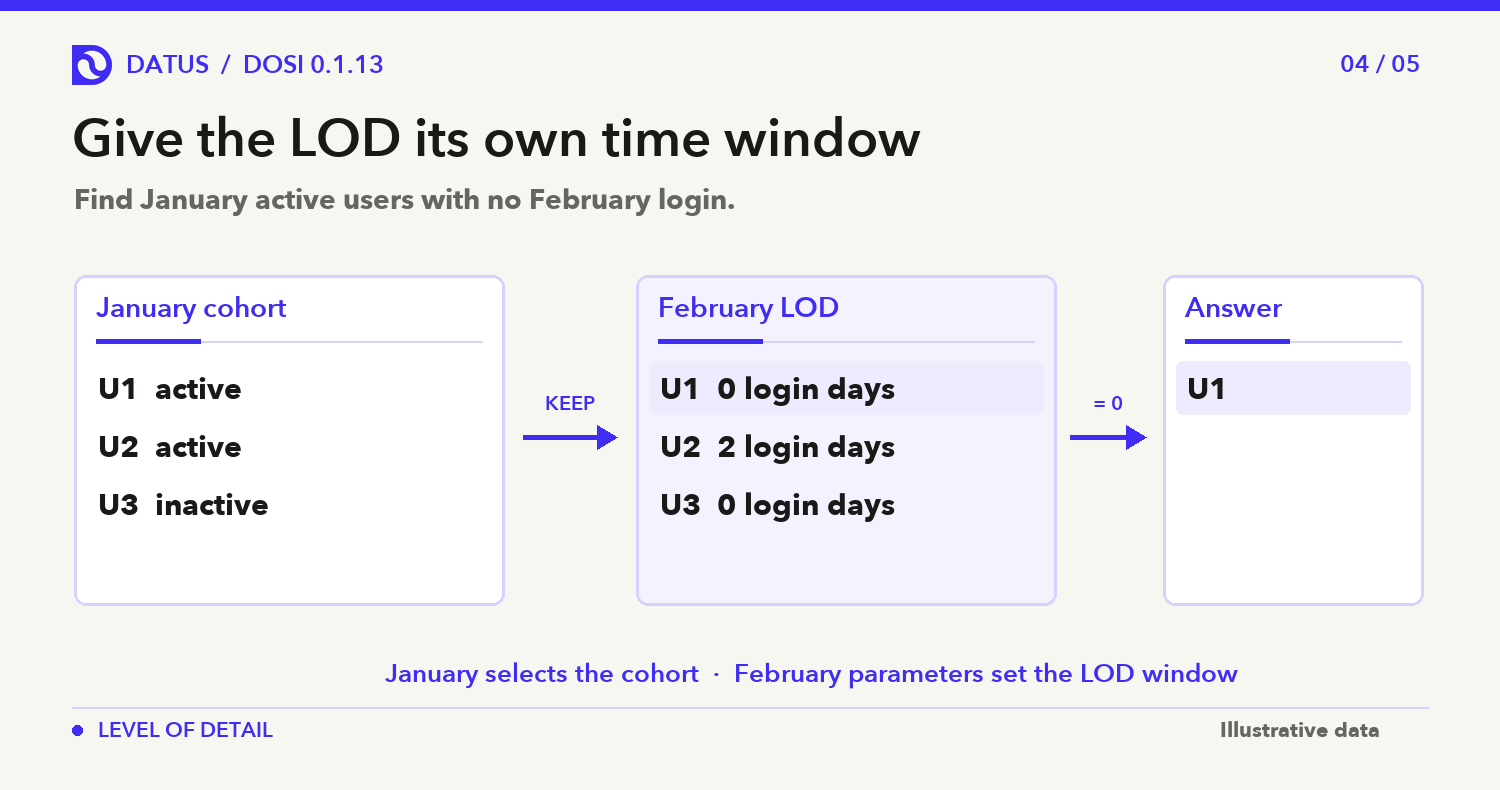
Model excerpt: define login_days as COUNT(DISTINCT logins.login_day). The parameterized login_days_in_window metric filters that base, and the fixed field repeats its aggregate SQL.
metrics:
  - name: login_days_in_window
    custom_extensions:
      - vendor_name: DATUS
        data: '{"v":"1.11","params":[{"name":"window_start","type":"int","default":19700101},{"name":"window_end","type":"int","default":20991231}],"derive":{"type":"filter","base":"login_days","where":"logins.login_day >= :window_start AND logins.login_day <= :window_end"}}'
datasets:
  - name: logins
    fields:
      - name: window_days
        expression: {dialects: [{dialect: ANSI_SQL, expression: "COUNT(DISTINCT logins.login_day)"}]}
        custom_extensions:
          - vendor_name: DATUS
            data: '{"v":"1.11","requires":["lod"],"lod":{"expr":"fixed(login_days_in_window, logins.user_id)"}}'
Assuming active_users counts distinct logins.user_id, the outer filter chooses January users; the parameters make the LOD count February days:
{"metrics":["active_users"],"group_by":["logins.user_id"],
 "where_sql":"logins.login_day BETWEEN 20260101 AND 20260131 AND logins.window_days = 0",
 "params":{"window_start":20260201,"window_end":20260228}}
Detail queries read levels of detail. After seeing a grouped answer, an analyst can use dosi select to list the actual flights with zero open alerts or the users with at least two active days. A fixed field on the starting dataset can be shown, filtered, and sorted like another field. DOSI attaches one calculated value to each matching record, so the row list keeps its original grain.
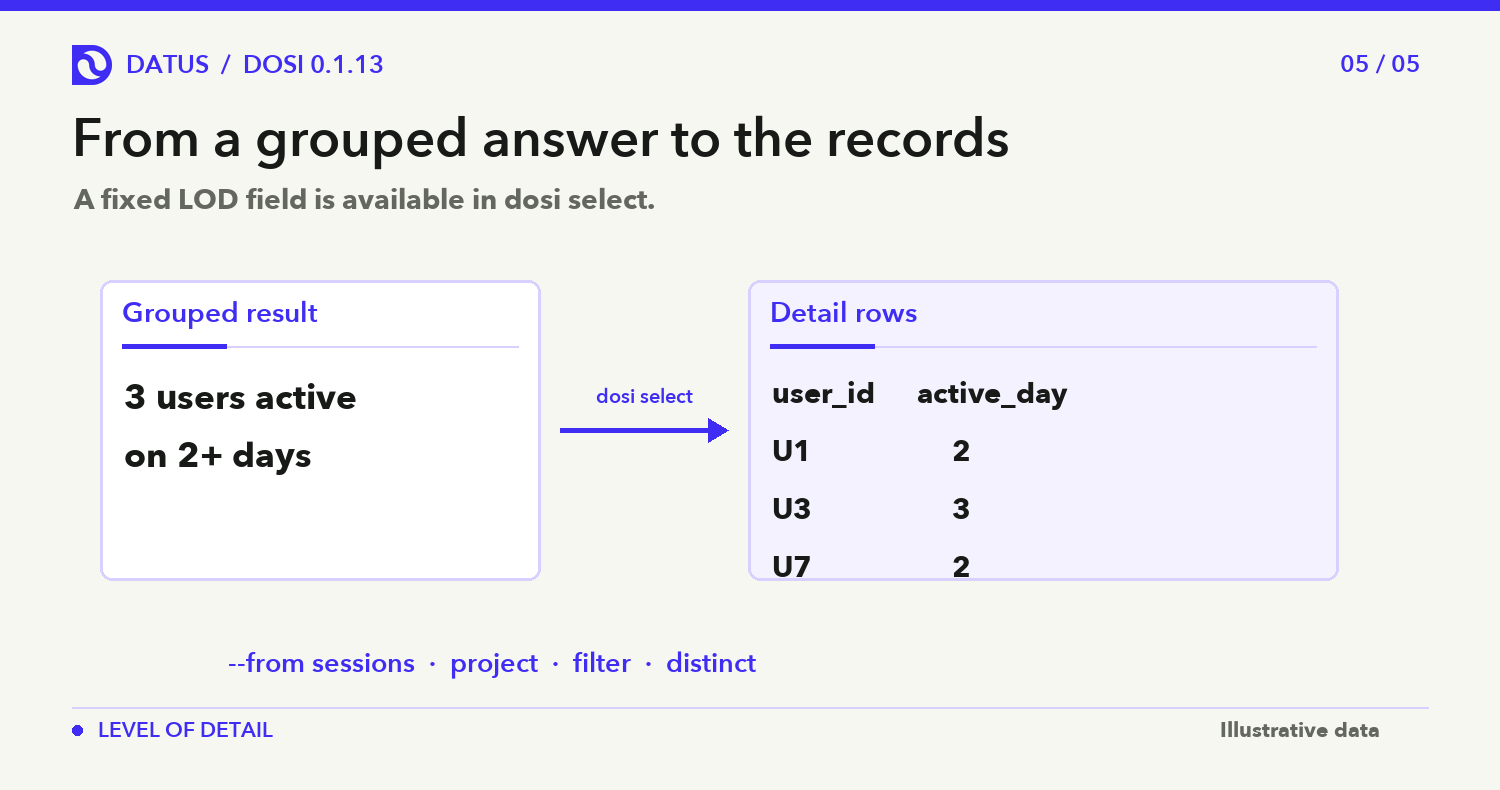
Using the fixed sessions.active_day field above, list the users behind the 2+ day bucket:
dosi select --from sessions \
  --fields sessions.user_id,sessions.active_day \
  --where "sessions.active_day >= 2" \
  --start-time 2026-09-01 --end-time 2026-10-01 \
  --distinct
Two fact tables can also share an LOD axis. For example, a sessions table can calculate days with a session per user, while an orders table calculates days with an order per user. A declared D-CONFORM pairing aligns those fixed fields, so DOSI can report users by session-day count and users by order-day count on the same “number of days” axis. It aggregates each fact separately before aligning the results; it does not join the raw session and order rows and multiply the counts.
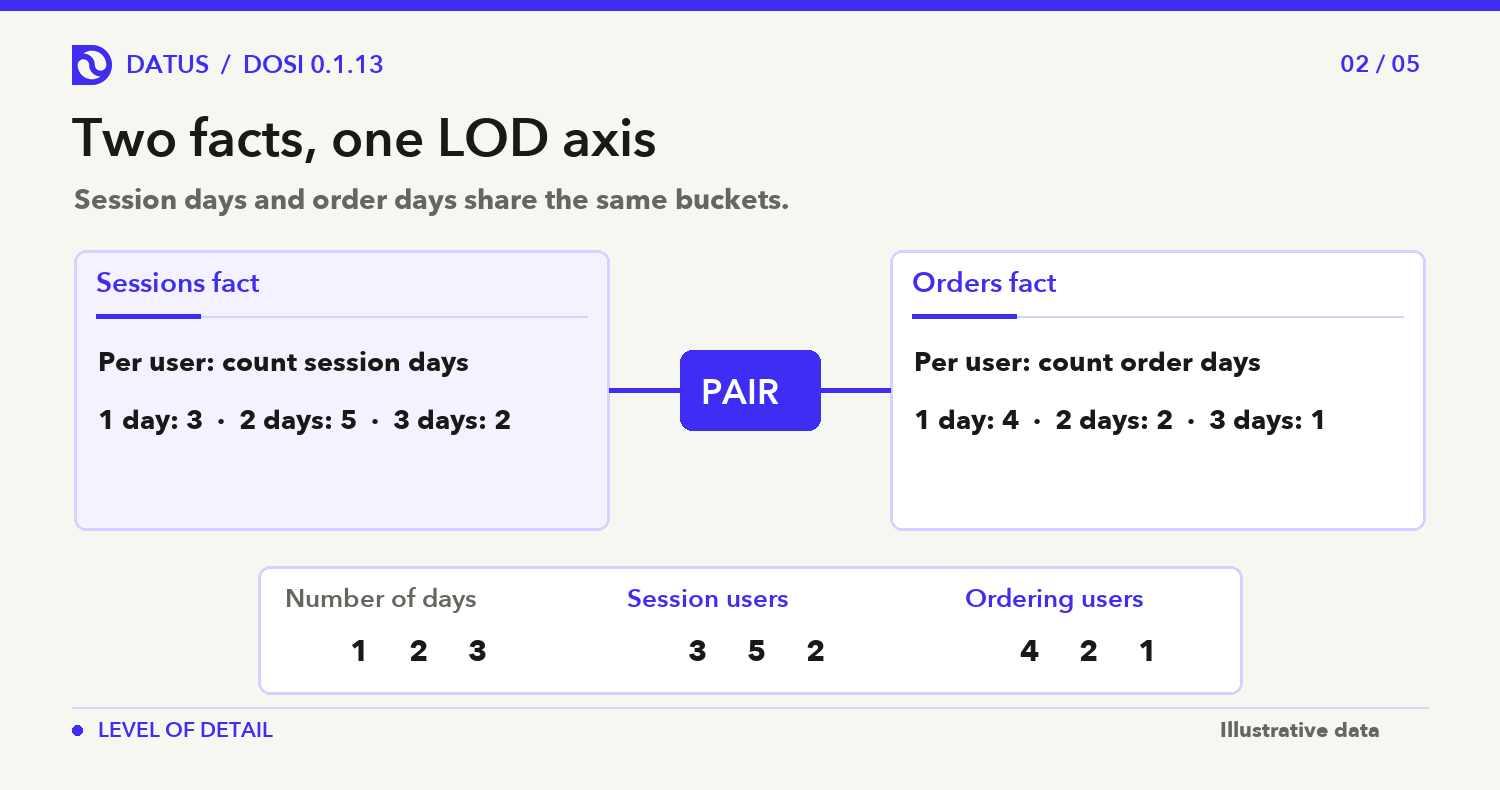
Model excerpt: define session_days as COUNT(DISTINCT sessions.event_date) and order_days as COUNT(DISTINCT orders.event_date). Each fixed field repeats its base aggregate; D-CONFORM pairs the axes.
datasets:
  - name: sessions
    fields:
      - name: active_day
        expression: {dialects: [{dialect: ANSI_SQL, expression: "COUNT(DISTINCT sessions.event_date)"}]}
        custom_extensions:
          - vendor_name: DATUS
            data: '{"v":"1.11","requires":["lod"],"lod":{"expr":"fixed(session_days, sessions.user_id)"}}'
  - name: orders
    fields:
      - name: active_day
        expression: {dialects: [{dialect: ANSI_SQL, expression: "COUNT(DISTINCT orders.event_date)"}]}
        custom_extensions:
          - vendor_name: DATUS
            data: '{"v":"1.11","requires":["lod"],"lod":{"expr":"fixed(order_days, orders.user_id)"}}'
relationships:
  - name: session_order_days
    from: sessions
    to: orders
    from_columns: [active_day, event_date]
    to_columns: [active_day, event_date]
    custom_extensions:
      - vendor_name: DATUS
        data: '{"v":"1.11","requires":["cardinality"],"cardinality":"many_to_many"}'
Assuming session_users and order_users each count distinct user IDs on their respective fact tables, query both metrics on the shared axis:
{"metrics":["session_users","order_users"],
 "group_by":["sessions.active_day"]}
The placement of a filter matters. A time range or context_filter limits the rows used to calculate a fixed LOD value. A regular where filter can select rows after that value has been calculated. “Days active on channel 2” and “users seen on channel 2, grouped by all their active days” are different questions; DOSI provides a way to express each one.
Datus Agent 0.4.3 puts DOSI in the metric workflow
In 0.4.3, DOSI is built into Datus Agent. Agent uses it to discover metrics and their available dimensions, run metric queries and attribution, validate models, and support edits in Explorer. That gives analysts one semantic engine across those steps when they work with a defined metric.
Agent also exposes context_filter, which lets a metric query set its input population before aggregation or a window calculation. Metric discovery now includes parameter types, defaults, and allowed values, helping a user form a valid follow-up question.
The other notable addition is SQL lineage analysis. Agent can inspect SQL files and SQL embedded in Python DAGs to trace dependencies and joins. Alongside project documents and schema metadata checks, it can use that evidence to build an AGENTS.md project map and knowledge files for different areas.
The two releases address different parts of the same handoff. DOSI gives a metric a declared calculation grain and a query path. Datus Agent can use that metric while exploring a project whose SQL and documentation may explain where the underlying data comes from. Neither release removes the need to review a business definition: the model still has to name the right user, date, filter, and source. The improvement is that those choices can be inspected in the model and carried into later questions, rather than reconstructed from a plausible-looking query each time.
Conclusion
The practical goal across both releases is to make a number’s meaning easier to carry from one question to the next. DOSI states and executes the calculation level; Datus Agent brings the model into the analyst’s workflow.
Release notes and further reading
- DOSI 0.1.13 release notes — full LOD changes, fixes, and known limits.
- Datus Agent 0.4.3 release notes — SQL lineage analysis and embedded DOSI.
- DOSI LOD documentation — definitions, examples, and Apache Ossie extension behavior.
- Apache Ossie core specification — current model and extension structure.
- Datus Agent semantic engine guide — how Agent uses DOSI.
Frequently asked questions
What does level of detail change in a metric query?
It lets a model calculate a value at one grain and present it at another. For example, DOSI can count active days per user before grouping users by that count. The grain is declared in the semantic model, so an agent does not have to infer it from raw session rows.
Is DOSI’s LOD syntax part of Apache Ossie core?
No. The Apache Ossie model carries the definitions, but DOSI 0.1.13 reads the LOD rule from a DATUS custom_extensions entry. Another Ossie consumer can read the core model without necessarily producing the same LOD calculation. Test that extension when sharing models across tools.
What changed in Datus Agent 0.4.3?
Datus Agent embeds DOSI for metric discovery, queries, attribution, validation, and Explorer editing. Its /init workflow also analyzes SQL dependencies and joins in SQL files and SQL embedded in Python DAGs, then uses that evidence with project documentation and schema checks to build a project map.
When should I use context_filter instead of where_sql?
Use context_filter when the condition should limit the input rows before DOSI calculates a metric or fixed LOD value. Use where_sql when you want to filter the resulting groups or selected metrics after that calculation. For example, “days active on channel 2” and “users seen on channel 2, grouped by all their active days” place the channel condition at different stages and can return different answers.
Related articles
- The semantic layer in the agent loop — why metric definitions belong in an agent’s analysis workflow.
- What is a semantic model? — the model behind shared metrics and dimensions.
- Semantic model examples — a small model you can check by eye.
- DOSI as a semantic layer for agents — the agent-facing query interface.