
When Agent Memory Conflicts with Approved Metrics
Keep AI agent memory aligned with approved metrics. Follow a business-rule change through semantic models, review, project updates, and existing reports.
TL;DR
An Agent can remember correctly and still use an outdated business rule. Keep metric definitions reviewable, encode when changes apply, and verify that each consuming project has adopted them. Datus connects model maintenance, review, retrieval, and calculation; existing memories and reports still need an explicit update path.
Yesterday’s useful correction can become today’s wrong answer
An analyst tells an Agent that net sales includes employee purchases. The Agent remembers the correction and uses it in later work. A month later, Finance changes the rule: exclude employee purchases for orders placed from November 1 onward. The Agent still remembers a statement that was correct when someone made it.
Nothing about this conflict requires a hallucination. The source can be real, the SQL executable, and the remembered correction faithful to the conversation. The question is whether that instruction still applies. A system that retains knowledge needs a way to handle knowledge that has changed.
Persistent context is becoming part of everyday Agent workflows. Perplexity’s November 6 changelog describes Teammates using memory for ongoing work, alongside Project Brain updates from conversations and files. This is a useful industry signal: earlier interactions increasingly shape later tasks. It also creates a design question for analytics teams: how should remembered knowledge relate to an approved business definition? The announcement describes memory capabilities, not a test of metric governance. Perplexity’s changelog provides the original product context.
Agent memory preserves context from earlier interactions. An approved metric defines a calculation accepted for a particular business purpose. Memory can help an Agent find the right metric, recognize a familiar question, or use a preferred presentation style. The shared definition determines which business rule the calculation should execute.
The conflict becomes especially easy to miss when both sources sound authoritative. A finance analyst supplied the earlier correction; Finance also owns the newer model. Asking the Agent to prefer a trusted author does not resolve this situation. It needs the rule’s scope and effective period, plus evidence that the query is using the intended definition.
This article follows a definition after the business changes it. The earlier question—whether a discovered rule deserves to become reusable knowledge—is covered in our business-rule validation guide.
One quarter, three plausible answers
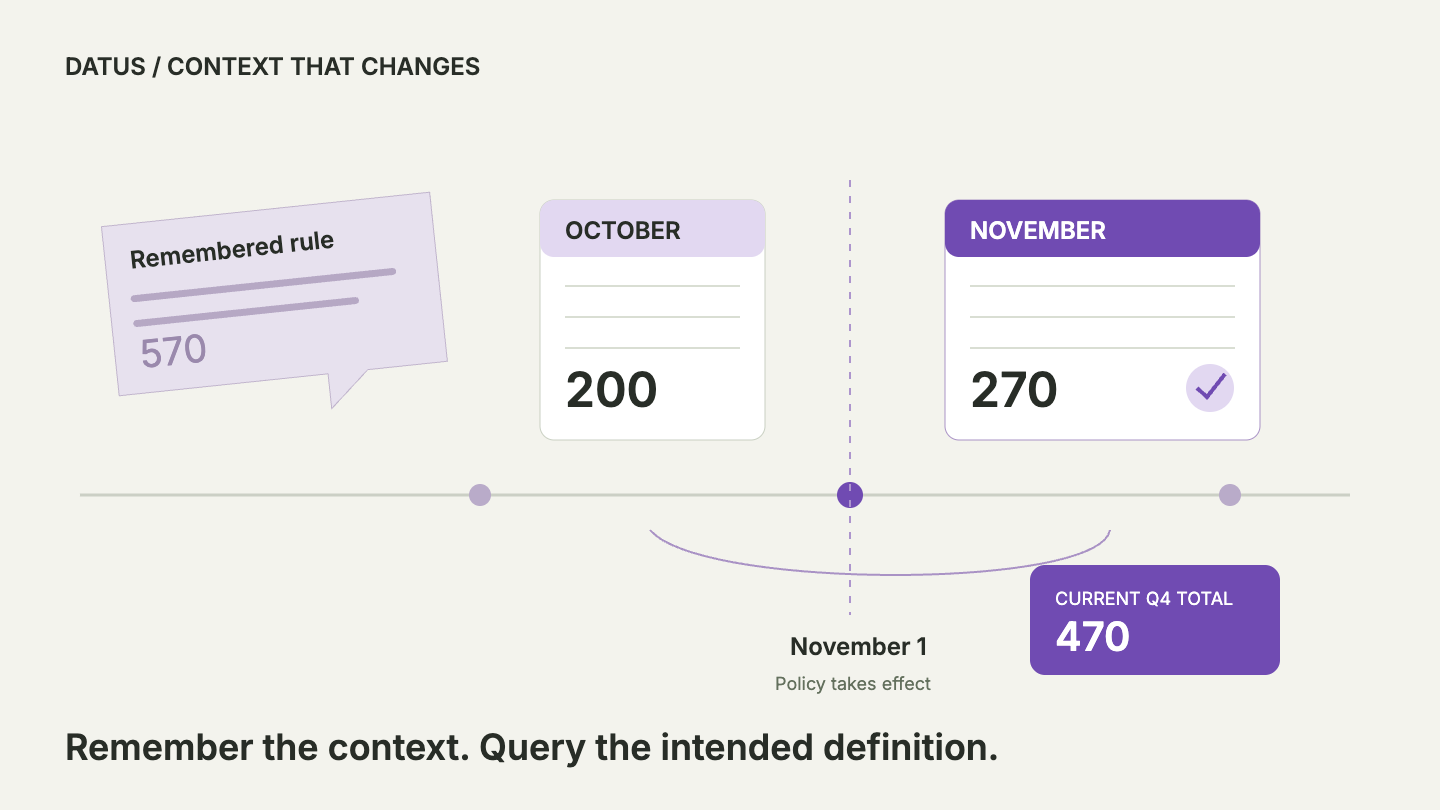
Consider a fictional retailer, Northstar. Its Finance owner decides that employee purchases stop contributing to net sales for orders dated November 1 onward. October remains under the previous rule. The team uses UTC business dates and subtracts refunds; a missing refund counts as zero. This is an illustrative operating metric, not a general revenue-recognition policy.
| Order | Business date | Employee purchase? | Amount less refund | Contribution under the chosen policy |
|---|---|---|---|---|
| October order | October 15 | Yes | 200 | 200 |
| November employee order | November 5 | Yes | 100 | 0 |
| November regular order | November 6 | No | 270 | 270 |
For these three orders, the fourth-quarter total under the chosen policy is 470. An Agent that repeats the old rule includes the November employee order and returns 570. An Agent that applies the new exclusion to the entire quarter returns 270, removing an October purchase that Finance intended to retain.
All three totals can come from valid SQL over the same records. The difference is how the rule applies over time. “Use the latest definition” leaves a consequential question unanswered: does that definition preserve the earlier policy for October, or recalculate October under the new policy?
For Northstar, the policy is prospective. A different business could deliberately restate the entire quarter. Another might retain both measures under distinct names for comparison. The Agent should not choose among these interpretations simply because one produces a cleaner trend or appears in a more recent conversation.
The downloadable example bundle includes the sample orders, a semantic model, an independent reference query, and a verification script. The model’s three named metrics deliberately represent the three policies. Compiling them with DOSI and executing the resulting SQL against the fixture reproduces 570, 470, and 270. These checks verify the calculations; they do not simulate an Agent autonomously deciding which policy Finance intended.
Decide what changed before updating what the Agent remembers
A useful change record explains the business decision in terms someone can check. For Northstar: employee purchases remain included before November 1; they are excluded from that date onward; refunds continue to reduce included orders; the date boundary uses UTC. The record should identify the owner and the supporting decision, together with examples of what should and should not change.
The record needs to distinguish the policy’s effective date from the date someone saved it. Finance might approve the rule on November 5 but apply it to orders from November 1. A timestamp on the document cannot express both facts. The same distinction matters when a model is approved today for use next quarter: approval alone does not make the future rule applicable to today’s question.
Historical questions also need interpretation. “What did we report for October?” asks about a recorded result. “What would October look like under the new policy?” asks for a comparison. “What is the fourth-quarter total under the approved policy?” asks for the combined treatment in our example. Reusing one cached answer for all three questions would hide the distinction the reader needs.
Scope matters as much as time. A regional exception may be valid without replacing the company-wide definition. A temporary investigation might intentionally include employee purchases to explain the change. Give that analysis an explicit label and scope so it does not silently become the default for everyone else’s net-sales questions.
The practical principle is to preserve useful memory while moving reusable calculation rules into an inspectable definition. A memory entry can point to the metric and its owner. It can remind the Agent that historical treatment matters. Copying the entire formula into every conversation makes each copy another place that must be found when the rule changes.
How Datus carries the change into analytical work
Datus provides an Agent for data work, Datus Studio for working with the project’s context and models, and DOSI for executing semantic calculations. A semantic model connects a named business metric to the data and calculation behind it. That gives a correction somewhere durable to live beyond a conversation. The semantic layer solution introduces these components.
The useful process is revise and check → review and share → adopt in the consuming project → retrieve and query. These stages have separate outcomes. A model can be correct locally but still await review; a shared change can be merged while another project still uses an older copy.

Revise the model and check the business result
In Studio, the Metrics Editor maintains the calculation and related business properties in the project’s semantic model. A draft remains distinct from the saved definition. Saving and synchronizing the knowledge base makes the changed definition available to the project’s Agent; an unsaved edit does not change the definition used by a saved-metric query.
For Northstar, the meaningful check is whether the revised calculation preserves the October employee order and excludes the November one. A structurally valid model can still encode the wrong policy, so compare the result with an independently reviewed reference. The SQL-to-business-metrics walkthrough explains this separation between model validation and checking the business output.
A synchronization failure is another separate outcome. A file may have been saved while searchable metric records remain incomplete. Studio distinguishes that condition from a successful save-and-sync. Resolve it before treating the new definition as available to the Agent. This avoids mistaking an updated editor view for evidence that retrieval has caught up.
Review the shared change, then adopt it in each project
Where Semantic Hub is enabled and the user has the necessary permissions, teams can submit a model file for review and merge it into shared context. The workflow checks the model and metric compilation, shows changes and conflicts, and records reviews. Merging requires a fresh approval after the latest submission, resolved conflicts, and checks that pass or have permitted warnings waived. An authorized Hub Admin performs the merge.
Those controls provide a review path; reviewers still need to assess the business decision. A passing compilation check does not establish that November 1 is the right effective date. Northstar’s reviewer should inspect the proposed policy and the expected 470 result alongside the model changes.
Consuming projects then pull eligible model files from the Hub and index their metric records. Pulling copies the whole selected model file, and file delivery and indexing are reported separately. An existing project needs the intended version and successful indexing before its Agent can retrieve the update. A shared merge does not establish that every project’s copy has changed. The Semantic Hub guide in Studio (sign-in required) describes these review and adoption stages.
Retrieve the definition before answering again
Datus AskMetrics works from existing semantic metrics. It reads a metric’s definition before selecting groupings, filters, or calculations, then queries through DOSI. If no suitable metric exists, the default workflow says so instead of substituting an improvised raw-SQL answer. The AskMetrics guide explains this scoped behavior.
For our example, the Agent needs the intended net-sales definition and the fourth-quarter date range. The result is 470 because the model contains the prospective rule. Retrieving a metric with the same name from an outdated project would still give the wrong basis, which is why adoption must be checked before relying on a fresh conversation.
Review the memory that still points backward
Datus also has a memory-organization workflow that examines persistent stores for contradictions, duplicates, stale entries, and knowledge stored in the wrong place. It proposes a remediation plan and waits for confirmation before applying changes. That offers a practical way to review the old employee-purchase instruction alongside the updated model. See the Memory Organization guide.
For Northstar, the useful outcome is a concise reference to the approved metric and a clear note about historical scope. This is a reviewable cleanup process, not a promise that every model merge automatically edits all Agent memories or third-party clients. Verify each consuming workflow that matters to the team.
What happens to existing dashboards and HTML reports?
The presentation format does not tell you where the calculation lives. Two dashboards can look identical while one queries a shared metric and the other runs a saved SQL expression. After a definition changes, those paths require different updates.
An HTML report with embedded results remains a snapshot. Regenerating it can produce a new answer, but changing the semantic model does not rewrite the file someone already downloaded. Preserve the original report if it records what the team actually reviewed, and label a replacement if the business decides to restate the analysis.
An interactive dashboard can query fresh data while retaining old business logic. Datus’s generated dashboard workflow uses saved SQL templates to re-query when filters change, whereas its generated report workflow embeds results when the report is built. Consequently, a refresh alone does not prove that a dashboard adopted a changed metric definition. Review the relevant query template and regenerate or update it where needed. The dashboard guide explains the live-query versus static-report distinction.
| Consumer | Evidence to check after Northstar’s change |
|---|---|
| Agent querying a project metric | Intended definition is present and retrievable; the query uses the requested period. |
| Saved conversation | Earlier instruction is identified as historical or superseded for later orders. |
| Reusable SQL | The expression implements the prospective exclusion, including the date boundary. |
| Interactive dashboard | Saved query logic has adopted the policy; refreshing returns the expected result. |
| HTML report | Its stated policy, data cutoff, and generation time match the intended report. |
These checks also prevent an unnecessary rewrite. A report labeled as the October close may remain valid under the old policy. Its usefulness depends on preserving that context. A current-quarter report labeled with the new policy needs the new result. Treating every historical artifact as defective would erase the evidence needed to explain why previous decisions made sense.
Schedules introduce another practical distinction. A task can run successfully every morning while executing the same old SQL each time. Check what it invokes, who owns that artifact, and how its update was verified. A successful run proves execution completed; it does not prove policy adoption.
Test the change from the consumer’s point of view
A useful acceptance test asks the system a business question through the path people will actually use. Running the model alone checks the calculation. Asking through a consuming project also checks whether that project can find and use the intended definition. Reopening an old conversation adds the possibility that earlier context will influence the answer.
For Northstar, start with the three-order fixture because someone can calculate the answer without trusting the Agent. The known difference between 570 and 470 is exactly the November employee purchase. That makes a wrong answer diagnosable. If the result is 270, the problem is historical treatment; if it is 570, the prospective exclusion did not reach the calculation.
Then test the effective boundary explicitly. Add an employee order immediately before November 1 and one on November 1, using the agreed business date. Also check a regular order with a refund and one without a recorded refund. The bundle includes separate checks for these boundary cases, with explicit expected totals. It also checks that an order outside the requested quarter does not enter the result.
Include the question that invites the old answer: “Use the same net-sales definition we used last month.” A useful response should recognize that the requested period may cross a policy change. It should explain which definition it intends to use or ask for clarification. Evaluate that behavior separately from whether the final SQL executes.
A second test should deliberately leave one project on the previous model. This creates a controlled adoption failure. The expected outcome is visibility into which version the project uses, followed by a verified update. Do not change the expected number until it matches whatever the Agent happened to return; that would turn the test into a record of current behavior rather than a check against the owner’s decision.
Finally, compare a newly generated report with an older saved report. Both may be legitimate if their labels identify different policies or generation times. The failure is an unexplained discrepancy: two artifacts presented as the same metric, period, and policy but calculated differently. Preserve the query and definition references needed to investigate it.
Hold the data cutoff steady during the comparison. A refund arriving between two runs can legitimately change net sales even when both consumers use the same approved definition. First compare against a fixed sample, then test current data with its refresh time recorded. If the values differ, separate changed input records from changed calculation rules before diagnosing a memory problem. This gives the reviewer a concrete explanation to investigate instead of treating every disagreement as evidence of stale context.
The acceptance record can stay small: the question, model revision or reference, reporting period, expected result, actual result, and the consumer tested. Use it again when another project or Agent adopts the metric. Our data lineage guide covers how to connect an answer with the evidence behind it.
Keep a correction from becoming the next stale rule
A correction should leave the system easier to maintain. After Northstar resolves the discrepancy, the next analyst should be able to discover the chosen definition and understand why October and November receive different treatment. They should not need to search a private conversation to reconstruct the policy.
Assign responsibility for the whole change, including its consumers. Finance owns the intended meaning and historical treatment. The model maintainer represents that decision and supplies comparison evidence. The owners of affected projects, queries, and reports confirm adoption. One person may perform several roles, but the outcomes still need to be distinguishable.
Also plan for a rejected change. If review finds that the proposed exclusion was mistaken, retain the approved definition and explain why the proposal was declined. A newer memory or draft should not outrank it simply because it was written later. If a merged change needs correction, make another reviewable revision and reassess the affected consumers; reverting a file does not undo reports already shared.
The aim is to avoid solving the same disagreement in every interface. Memory remains useful for preferences, context, and references. Shared definitions make the calculation reusable, while review and adoption checks make changes observable. Together they let an Agent benefit from earlier work without treating every remembered statement as permanently applicable.
Conclusion
For Northstar, the fix is more than teaching the Agent to answer 470. The team must represent the prospective rule, check the result, review the shared definition, update consuming projects, and identify reports that still contain the old logic.
Datus provides model maintenance, a governed sharing path where Semantic Hub is enabled, definition-based queries, and a workflow for reviewing stale memory. The team supplies the policy decision and verifies its adoption. A useful standard for completion is simple: the next person can inspect why the answer changed, and the next Agent can retrieve the definition that explains it.
Frequently asked questions
Can Agent memory replace a semantic model?
Memory retains background, preferences, decisions, and references. A semantic model defines executable calculations and their data mappings. For a shared business metric, memory should help find the intended definition rather than serve as the only copy of its formula.
Does the newest metric definition apply to historical data?
Only if the policy says so. A prospective change applies from an effective boundary; a restatement changes earlier periods. The owner must specify that treatment, and the model and comparison examples must reflect it.
Does merging a model into Semantic Hub update every Datus project?
A Hub merge and a project pull are separate stages. Consuming projects need the intended model files and successful indexing. Check the project’s definition and query result rather than assuming a shared merge refreshed every copy.
Can Datus help find stale or conflicting memory?
Its memory-organization workflow reviews persistent stores for stale entries, conflicts, duplicates, and classification problems. It proposes changes for confirmation. This is distinct from automatically invalidating all memories when a metric changes.
Will an existing HTML report change when the metric changes?
A report with embedded results remains a snapshot until regenerated or replaced. A live dashboard may still use saved SQL that needs updating. Check both the data refresh path and the calculation behind the presentation.