
AI Dashboards: Is the Dashboard Dead?
What is an AI dashboard? See how agents turn a question into a visual report, where semantic metrics keep it consistent, and when fixed dashboards still win.
TL;DR
- An AI dashboard uses AI to help create or explore a visual answer. An agent-generated dashboard can assemble an HTML view from a question; a semantic layer keeps its metrics tied to reviewed definitions.
- Dashboards are still useful. What can change is the manual work of building a new layout for every question.
- Keep persistent dashboards for recurring monitoring and approved reporting. Generate a view when the question changes faster than a fixed layout can.
“Dashboards are dead” is a useful provocation. It is a poor description of what people are actually giving up. A manager who sees revenue fall still wants a trend, a regional breakdown, and a table of the orders behind the change. What they may no longer want is a ticket to the BI team, a new blank canvas, and another long-lived dashboard built for a question that will be different next week.
The better question is who builds the visual answer, and what gives its numbers meaning? Today an agent can generate a page with cards, charts, tables, and filters. That page can be a dashboard even if no one opened a drag-and-drop editor. But if the agent invents the definition of revenue on the fly, a faster page is simply a faster way to publish an inconsistent number. The shape of the interface can change quickly; the underlying metric should change through a deliberate review.
What is an AI dashboard?
An AI dashboard is a visual report that uses AI to help people build charts, explore data, or ask follow-up questions. Some products add AI assistance to a dashboard editor. An agent-generated dashboard goes further: it turns a question into a page of metrics, charts, tables, and filters. Either way, the numbers still need clear definitions and access controls.
Those two ways of building a dashboard answer different needs. AI assistance can make an established reporting workflow quicker without changing its publishing model. An agent can instead assemble a temporary view for a question the team has not anticipated. A useful test is to ask what the AI actually does: suggest a chart, answer a follow-up, write a query, generate the whole page, or maintain it after publication? “AI dashboard” alone does not tell you which of these capabilities you get.
What the old workflow made expensive
A typical dashboard request begins with a question: “Why did completed orders fall?” Someone turns that into a specification for metrics, joins, dimensions, refresh timing, and visual layout. An analyst implements calculations in a BI model or report, chooses charts and filters, and shares a link. A second team asks for the same metric with a different cut, so another report or copied tile appears. Over time, teams maintain a collection of pages that partly overlap but do not always agree.
There is nothing inherently wrong with a visual editor. It gives people direct control and can produce an excellent stable report. The cost is the repeated translation from a changing question into a fixed layout. If the question is recurring, that cost can be worth it: a shared weekly revenue dashboard has a clear audience and owner. If the question is exploratory, a permanent new page may be a poor fit. The drag-and-drop workflow asks the team to decide on a durable screen before it knows whether the question will recur.
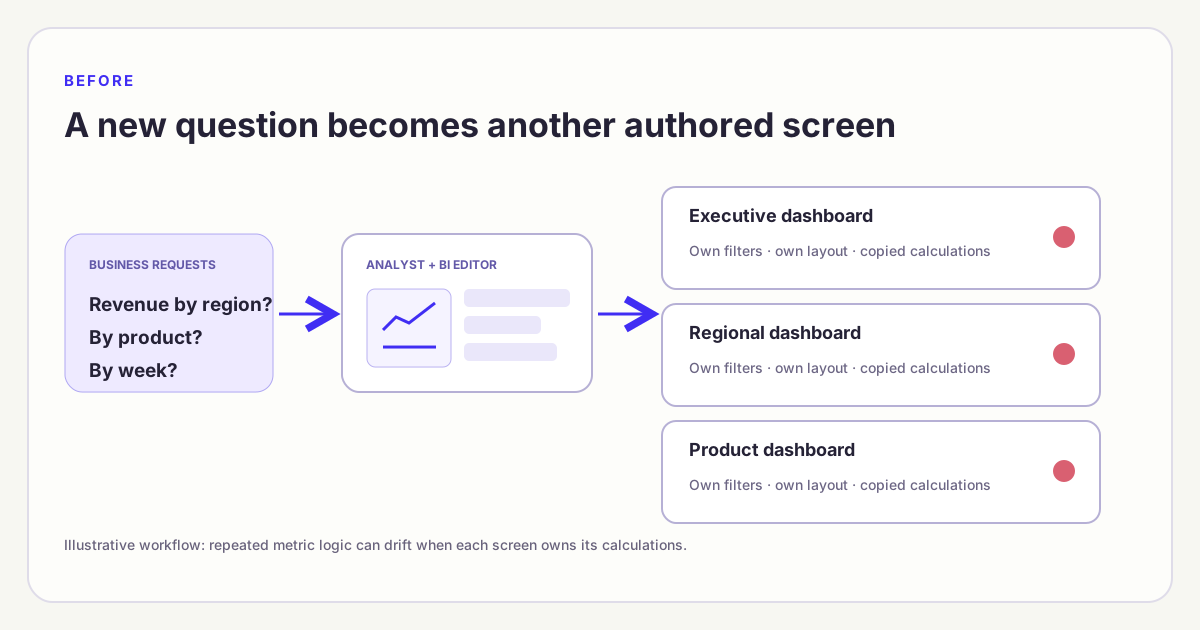
The traditional route can work well for a stable report. Its friction appears when each new investigation requires another designed screen and a copied calculation.
That is the first distinction hidden by the slogan. The dashboard as a visual form is still useful. The dashboard as the unit of manual authoring is becoming less necessary. Treating those as the same thing turns a practical workflow change into an argument about whether people still like charts. They do. The real issue is whether every useful chart needs to begin as a hand-built, permanent artifact.
How an agent-generated AI dashboard gets built
Imagine asking, “Show completed order revenue for twelve weeks, then split the decline by region and product line.” An agent can plan the relevant queries, render a trend and breakdown, and place the results on a browser page. A follow-up question can change the page: add a comparison period, replace a bar chart with a table, or make region a filter. The reader still gets a dashboard-like visual answer. The layout is now assembled in response to a question rather than chosen from an empty canvas in advance.
The agent should not get to reinvent the metric every time it redraws the page. If “completed order revenue” already has a reviewed definition, the generated page should request that definition and disclose its filters and time window. This is the role of a semantic layer: it provides reusable business meaning beneath whichever interface displays the result. The agent may choose the view; the semantic model constrains the calculation. If a suitable governed metric does not exist, the query becomes an analytical proposal that needs review, not a silently approved new definition.
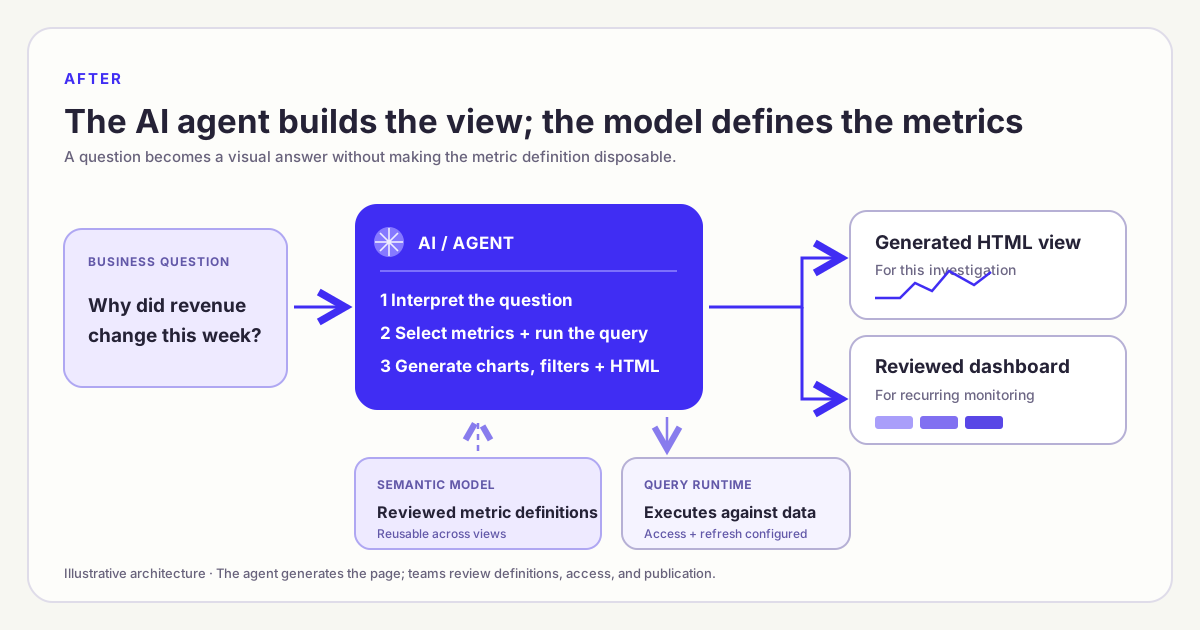
The AI agent generates the layout; the semantic model supplies reviewed definitions when available. A generated view becomes a recurring dashboard only after a team reviews and maintains it.
The diagram does not imply that every generated page is safe to publish. The data service still has to enforce access rules. The browser still needs a place to send live filter queries. The page still needs accessible labels, honest scales, and a way for a reader to check the metric behind a number. Those are product and operating choices, not properties of the word “agent.” Making the canvas fast moves attention to these contracts; it does not remove them.
This is also why composable analytics is a better name for the architectural shift than “the end of dashboards.” Reusable definitions, query interfaces, and presentation components can be assembled for different tasks. A daily report, an application view, and a generated AI dashboard may all show the same metric. The valuable ability is to change one view without losing agreement with the others.
Where persistent dashboards still win
Some questions should be answered before anyone thinks to ask. An operations team needs to notice a failed data pipeline. A sales leader wants to see a stable weekly sequence of bookings, coverage, and conversion. A finance team may need a signed-off monthly pack. For these jobs, a shared layout is a feature: everyone sees the same signals in the same places and can notice an unexpected change. An agent answering one question at a time does not replace passive monitoring, alerts, or a reviewed reporting cadence.
Atikant Jain, writing on LinkedIn about dashboards and AI agents, makes the useful distinction between known and unknown questions. A dashboard can show what is happening; an agent can then investigate why it happened. His retail example asks what a manager would even type into a chat window before seeing that sales, margin, or a store has moved. The example is an opinion from one practitioner, but it identifies a real interaction problem: an empty prompt is a weak substitute for a well-chosen set of recurring signals.
There is a second reason to preserve a fixed view: shared accountability. When a team agrees that a metric matters, it can pin the definition, period, owner, and audience. A dashboard can become a common reference in a meeting or an alert workflow. A generated page can be promoted to that status, but promotion is a deliberate step. Someone should test its calculations, name its owner, confirm who may open it, and decide how often it refreshes. A visual artifact is not disposable once people start using it to make repeated decisions.
The counterpoint is equally practical. Not every follow-up deserves its own permanent page. If someone asks whether a decline is concentrated in first-time customers, the answer might require two quick cuts and then never recur. Saving every such result as a dashboard creates a library no one can navigate. An agent can generate a temporary view for that investigation. If the same question appears again, the team can decide to retain and maintain it. This is a lifecycle decision, not a vote for or against dashboards.
What practitioners are actually debating
The debate is less settled than the headline suggests. In a r/BusinessIntelligence discussion, a consultant reported fewer dashboard requests from smaller clients and more demand for key numbers delivered in chat or messages. The same post said larger clients still wanted dashboards for deeper analysis, and that a solid semantic model was the difficult part of accurate AI answers. This is a report of that consultant’s own work, not a survey of the BI market. It supports a narrower observation: delivery channels can change before the need for trusted metrics does.
Another r/BusinessIntelligence thread about HTML dashboards asks whether agent-authored pages could become formal “golden reports” if their code, hosting, permissions, semantic layer, and refresh behavior were governed. That is a sharper question than whether a chart disappears. It recognizes that a generated HTML page can be a serious reporting surface, but only if it takes on the operational work a shared report requires. A good-looking file sitting on one person’s laptop does not satisfy those conditions.
These posts are viewpoints, not evidence that one architecture has already won. They agree on a narrower, useful principle: make interaction more flexible while keeping meaning and responsibility visible. A team can test that principle against a real metric and audience instead of treating a slogan as a product roadmap.
An AI dashboard example from Datus, with clear boundaries
Datus Agent’s documented HTML Dashboard Generation shows that this is already more than a future sketch. Its gen_visual_dashboard subagent can start with a question or existing metrics and create a page with KPI cards, charts, tables, and filters. It can use semantic metrics and dimensions when they fit the request; it can also use SQL and other project context. That distinction matters. A page built from a governed metric has a stronger claim to consistency than one built from a new ad-hoc SQL calculation, even if both pages look equally polished.
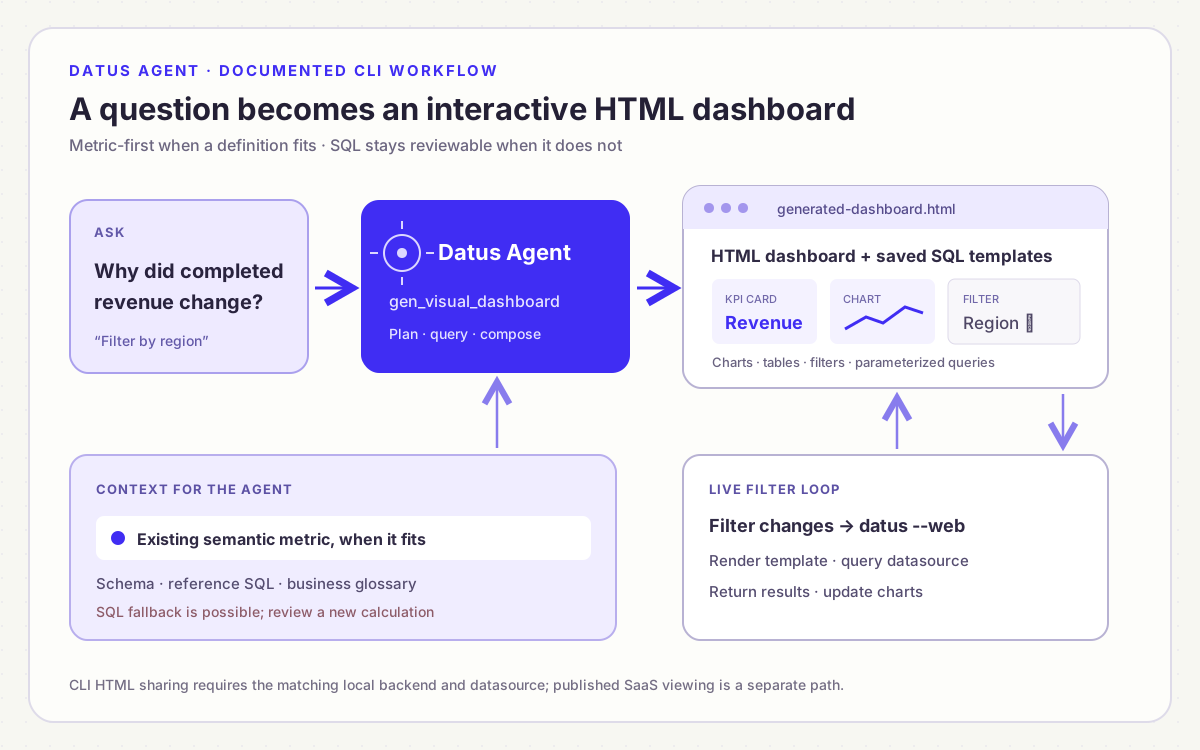
The documented CLI path: gen_visual_dashboard creates the view and query templates; filter changes reach datus --web and rerun against the datasource. A separate SaaS viewer exists in code, but is not part of this diagram.
In the documented CLI workflow, the generated HTML page sends filter changes to a local datus --web backend, which renders saved query templates and runs the resulting SQL. Sharing only the HTML file does not give another reader a live dashboard. The recipient needs an appropriate backend and datasource, or the team must use a separately deployed application path. Datus’s SaaS code includes a published-dashboard viewer with versioned render content and authenticated live-query requests, but code inspection alone does not establish its availability in a given deployment. A product mockup can illustrate the interaction; it should never be mistaken for a production screenshot.
The Dosi engine has a different responsibility. Its server exposes model and metric endpoints and query compilation or execution for semantic requests. The HTML dashboard generator belongs to Datus Agent; the semantic engine and model provide a possible governed query foundation. This is not a claim that every generated dashboard directly calls Dosi’s REST API. The actual path depends on how the agent and datasource are configured. Keeping those responsibilities separate prevents a diagram from promising more integration than the documentation establishes.
If a team wants to try the workflow, start with a question whose metric already has an owner. Ask the agent for one trend, one breakdown, and one filter. Compare the headline number with a trusted reference for the same date window and population. Change the filter and inspect whether it changes the query without redefining the metric. Then decide whether the result is a one-time investigation, a report snapshot, or something that deserves a published, maintained home.
What replaces the blank canvas?
The replacement is a short loop: ask, inspect, revise, and either discard or publish. The human still chooses the business question and checks that the answer is useful. The agent handles much of the routine assembly. The semantic model provides a stable vocabulary and calculations. A query runtime enforces access and refresh. A visual review checks that the page does not obscure the answer. None of these layers is glamorous, but together they let the user spend less time placing boxes and more time testing the explanation.
That loop changes the role of the analyst rather than removing it. An analyst may spend less time aligning cards and more time deciding whether “completed revenue” has the right population, whether a region filter means billing or shipping region, and whether the chosen chart hides a seasonal pattern. Those judgments are not cosmetic. They determine whether a view helps the reader make a correct decision. An agent can propose a layout and write code quickly; the team remains responsible for the claim the page makes.
It also changes what should be saved. Keep the metric definition and its tests. Keep the question and the query or query template needed to reproduce an answer. Keep a generated page when it proves useful repeatedly, and give it the same access, ownership, and versioning as any published report. Do not preserve every first draft merely because it was easy to generate. A searchable pile of generated pages can become the new dashboard sprawl if there is no retirement process.
So is the dashboard dead? No. The blank-canvas-first workflow is losing its monopoly. A visual answer can now be generated as part of an investigation, then revised in minutes. Some of those answers will be temporary; others will mature into the stable dashboards teams still need. The more views we can create, the more important it becomes to keep their metrics, access, and meaning consistent.
How to decide whether an AI dashboard is ready to share
Start with one question and one agreed metric. Suppose a sales team asks for completed order revenue by week and region. Before treating the generated page as a report, write down what “completed” means, which date field determines the week, whether refunds are included, and whose region the filter represents. The agent can suggest a chart, but these choices determine the answer. If the semantic model already defines them, the page should use that definition. If it cannot, label the result as an exploratory calculation and ask for review before circulating it as an official number.
Next, test the page with a question that has a known answer. Run the same metric, period, and filters in a trusted report or query, then compare the headline total. Change the region filter and check that the rows and totals change together. Try a period with no matching orders: the page should explain that there is no data, not draw a misleading flat line. Inspect the chart labels and units as carefully as the SQL. A viewer needs to know whether the line represents revenue, order count, or a percentage, and whether the dates refer to order creation or completion. These are simple tests, but they catch the difference between a plausible picture and a defensible analytical answer.
Then check the experience from the recipient’s side. Can the intended audience open the page and see only data they are allowed to see? Do filters still work when the author’s local service is closed? Can someone understand the result on a phone, with a keyboard, or without relying on color alone? An HTML file with live queries is not self-contained merely because it opens in a browser. If the page depends on a local backend, share a static snapshot for a one-time update or deploy an approved service for ongoing use. Document which option you chose so readers do not mistake yesterday’s snapshot for a live view.
Finally, decide whether the page deserves a permanent home. A one-off investigation can end with an answer and a reproducible metric request. A view used in a weekly meeting needs an owner, a stable link, a refresh expectation, and a way to retire or revise it when the business question changes. This is where the generated page becomes a maintained dashboard: not when the agent finishes drawing it, but when a team accepts responsibility for its numbers and its audience. The decision keeps the speed of agent-assisted authoring without turning every exploratory view into another unmanaged report.
Conclusion
Agents can change how quickly a dashboard is made, but they do not remove the need to see, share, and trust an analytical result. Use persistent dashboards for recurring questions and monitoring. Use agent-built HTML views when the question is new or changing. Put governed definitions beneath both, and make the promotion from temporary view to trusted report an explicit decision.
Frequently asked questions
What makes a dashboard an AI dashboard?
AI can help create visualizations, answer questions about a dashboard, or generate a new page from a prompt. The term covers these different workflows, so check which task the AI performs and whether the result is a temporary view or a maintained report.
Can AI create a dashboard from a prompt?
Yes. For example, Datus Agent’s documented HTML Dashboard Generation workflow can start with a question or existing metrics and generate a page with charts, tables, KPI cards, and filters. The result still needs review of its metric definitions, data access, and sharing setup before a team treats it as an approved report.
Will AI agents replace dashboards?
They can replace some of the manual assembly work and produce visual answers for one-off questions. Teams still benefit from stable dashboards for shared monitoring, alerts, and signed-off reporting. The practical change is that a dashboard can become an output of an agent workflow rather than a page that someone always builds from scratch.
Why does the semantic layer matter if the agent can write SQL?
An agent can produce SQL that runs but calculates a business term differently from the team’s approved definition. A semantic layer makes metrics, dimensions, and relationships reusable across the generated page and existing reports. SQL remains useful for new analysis, but new calculations should be identified and reviewed before being treated as governed metrics.
When should we keep a fixed dashboard?
Keep one when a team repeatedly watches the same signals, needs a common meeting reference, or relies on an approved report with a stable owner and period. An agent can still help create or revise that dashboard. A fixed view is valuable because it makes important changes visible without waiting for someone to type the right question.
Can I email someone a generated dashboard HTML file?
You can send a file, but whether it works as a live dashboard depends on its data connection. In Datus’s documented CLI workflow, interactive filter changes call a local backend. A recipient needs the matching service and datasource to use those live filters. For email, a static report or screenshot may be more appropriate if the audience only needs a snapshot.
Related articles
- Composable analytics: agent-built views, governed metrics — the reusable architecture behind generated views.
- What is headless BI? — separate metric definitions from one visual interface.
- What is agentic analytics? — how agents plan multi-step investigations.
- What is conversational BI? — asking follow-up questions against business data.