
Composable Analytics: Agent-Built Views, Governed Metrics
Composable analytics lets agents assemble HTML dashboards from governed metrics. See how reusable definitions support generated views and fixed reports.
TL;DR
- Composable analytics reuses metric definitions, query interfaces, and presentation components so an agent can build a fit-for-purpose HTML view from a question.
- The semantic layer owns metric meaning; the generated page owns layout, filters, and presentation. A polished chart is only as reliable as the query behind it.
- Keep fixed dashboards for recurring monitoring and shared reporting. Use agent-built views for questions whose shape changes from one investigation to the next.
One approved revenue metric may need to appear in an executive report, a product screen, and a one-off investigation. If each screen owns its own calculation, the team has to reconcile three answers before it can discuss the business question. Composable analytics starts from the reusable definition and lets each interface assemble the view it needs. An agent can make that assembly faster by turning a question into a focused HTML page, then revising the page as the investigation moves.
Composable analytics is the practice of building analytical experiences from reusable data, query, and presentation components. In an agent-driven version, a semantic layer provides reviewed metrics and dimensions, the agent selects the relevant pieces for a question, and a web page presents the result. The page may be temporary or worth keeping. Neither choice removes the need to define the metric correctly.
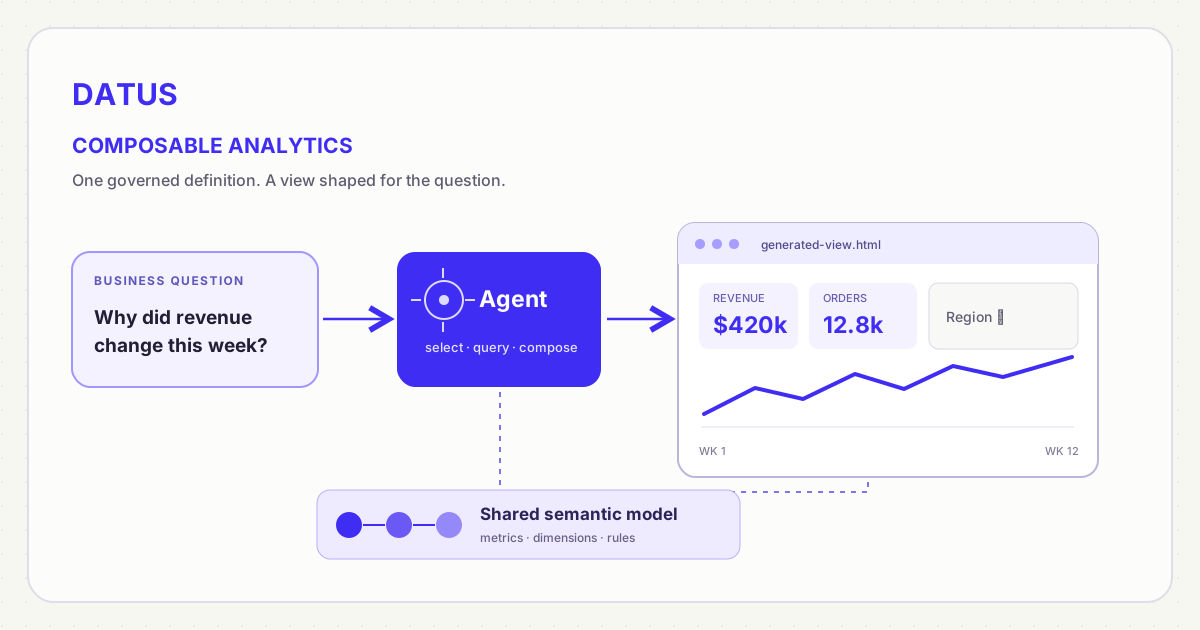
The reusable asset is the definition. The dashboard is one possible rendering of it.
What “composable” means for analytics
Composable analytics separates the parts that older BI workflows often bundled together: the data connection, the metric definition, the query interface, and the final screen. A developer can reuse those parts in an application, a report, or a dashboard instead of copying an entire BI page. The Sisense guide to composable analytics describes this component-and-API approach, including a headless query layer and reusable UI elements. That is the established meaning of the term; agent-generated HTML is one newer way to use the same separation.
The distinction matters because a charting library alone is not an analytics system. It can draw a line from JSON, but it does not decide whether revenue includes refunds, whether region means customer or store region, or which users may see a result. Those decisions belong upstream in data and query contracts. A headless BI approach makes that separation easier to see: the metric can serve more than one interface, while each interface chooses how to present it.
A practitioner discussion in r/BusinessIntelligence puts a useful condition on agent-built HTML: the report still needs a governed semantic layer, controlled access, reviewable code, and deterministic refresh if it is to become a trusted shared report. Those are the poster’s proposed safeguards, not proof that every generated dashboard already meets them. The point is that faster layout creation moves work toward the data and release contracts; it does not make those contracts optional.
Consider a product manager who asks for weekly completed revenue by region, plus the customer segments behind a sudden drop. One possible output is a fixed executive dashboard. Another is a generated HTML page with a revenue trend, a region breakdown, and a table of the affected segments. The second view is composed for the question; its layout is not a new definition of revenue. If the page and the executive dashboard request the same approved metric over the same period and population, their totals should reconcile.
That is the key architectural test. A component is reusable when a second consumer can ask for the same metric without copying the calculation out of the first dashboard. A generated page becomes risky when it hides a fresh SQL interpretation behind a familiar metric label. The goal is not to generate more screens. It is to let screens change quickly while business meaning stays reviewable.
| Layer | Reusable contract | What can change per question |
|---|---|---|
| Semantic | Metric, dimension, grain, relationship, time rule | Which approved objects the agent selects |
| Query | Parameters, time window, result shape, limits | Breakdown and filter values |
| Presentation | Accessible cards, charts, tables, labels | Layout and visual emphasis |
| Runtime | Data access, refresh, sharing, audit | Whether the result is temporary or published |
The table is not a claim that every product implements all four contracts. It is a checklist for evaluating an agent-built analytics workflow. In particular, reusable metric definitions do not automatically supply secure sharing or a production hosting model for a generated HTML file.
The dashboard is still useful; the canvas changes
A dashboard answers a set of questions in a visual form. Some of those questions are stable: “Did the daily order pipeline finish?” or “Are signups above the agreed threshold?” The same layout and signals help a team notice a change they were not already looking for. An on-demand chat answer is less useful for passive monitoring because no one may think to ask the right question at the right time. Groundcover’s account of dashboards and observability agents makes this practical point: persistent dashboards remain a shared reference while agents help investigate and generate new views.
Other questions are not stable enough to deserve a permanent tile. “Why did conversion fall in the North region last week?” may need a funnel, a cohort split, and a comparison to the prior period. A month later, the relevant breakdown may be a pricing tier or a different product. Building and maintaining a separate drag-and-drop dashboard for every possible path is expensive, while a single static page can only anticipate so much. An agent can assemble a view for the current question, then change the page when the user asks a follow-up.
The practical shift is from a dashboard as the primary authored asset to a dashboard as a generated view over reusable definitions. That does not mean nobody will ever use a visual editor. Visual editors remain useful when design teams need pixel-level control or analysts are refining a shared report. It means routine composition can begin with a question rather than a blank canvas. The reusable metric and the review process matter more than whether the first layout was created by a person or an agent.
| Need | Better default | Why |
|---|---|---|
| Watch the same operational signals every day | Persistent dashboard and alerts | Shared layout and passive monitoring |
| Explore a new question with changing breakdowns | Agent-built view | The page can follow the investigation |
| Send a signed-off monthly result | Versioned report or fixed dashboard | Reviewers need a stable artifact and period |
| Try several visual explanations of one governed metric | Composed views | The definition stays constant while presentation changes |
These are starting points, not universal rules. A useful agent-generated view can become a permanent dashboard if it recurs. A persistent dashboard can also be a starting point for a one-off investigation. The distinction is how frequently the question and its audience repeat, not whether the screen contains charts.
A concrete workflow: question to HTML
Suppose an operations lead asks: “Show completed order revenue and order count for the past twelve weeks. I want to filter by region, then see which product lines explain any drop.” Assume the data team has already approved completed_revenue, completed_order_count, order_week, region, and product_line in a semantic model. Those names stand for real population, time, and aggregation rules. This scenario is illustrative; it is not a customer deployment or a measured productivity claim.
The agent first resolves the request to those approved objects. It can propose KPI cards for both metrics, a weekly trend, a region comparison, and a product-line table. The page’s region filter changes the query parameters; it should not rewrite the definition of completed revenue. If a product-line field is unavailable for one metric, the agent should explain the limitation or ask for a different breakdown instead of inventing a join. This is the same distinction behind what agentic analytics requires from a semantic layer: the agent may plan and compose, but the data contract constrains what it can safely calculate.
Next, the agent generates the page and its query templates. A person reviews the labels, axes, time window, filters, and expected totals. The browser renders the result. If the lead asks, “Add a product-line filter and move the regional comparison below the trend,” the agent changes those modules without redefining the underlying metrics. This is composition, not a different way to drag the same widget across a screen.
As of October 2026, Datus documents a real implementation of this flow in HTML Dashboard Generation. Its gen_visual_dashboard agent can create an HTML page with KPI cards, charts, tables, and filters from a prompt. It can start from an existing metric, from supplied SQL, or from a mix of both. Documented semantic metrics and dimensions take precedence when they fit the question; the agent can also use database schema, reference SQL, and glossary context. The generated page opens in a browser, and live filter changes query a local datus --web backend.
That last point is easy to miss. The HTML file is a view, but its interactive filters are not a standalone hosted analytics service. The recipient needs the appropriate backend and datasource connection running; the documented sharing workflow calls this out. An exported static report is a different artifact. This distinction matters when planning distribution, permissions, and refresh: “the agent generated an HTML dashboard” does not by itself mean “the whole company can securely open a live URL.”
The codebase also contains a separate published-dashboard viewer in the SaaS frontend, with an authenticated query endpoint and versioned dashboard content. That architecture should not be confused with sharing the CLI-generated HTML file. The existence of the viewer in code does not establish which deployment or plan currently exposes it; this article’s setup guidance follows the public CLI documentation.
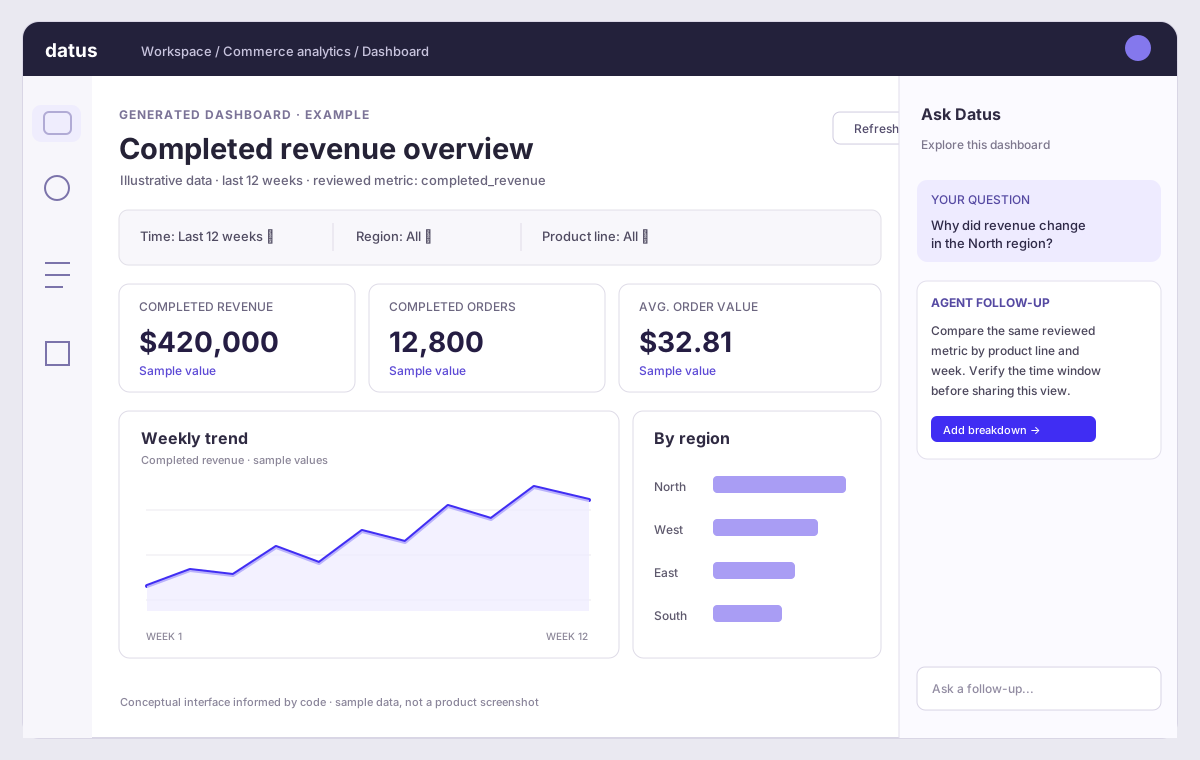
Illustrative interface, not a product screenshot. Its layout is informed by the Agent dashboard artifact and the SaaS dashboard viewer; labels and example values are invented for explanation.
The documented entry point is compact: run datus --web with a configured datasource, select /agent gen_visual_dashboard, then describe the metrics, filter dimensions, and time window. The documentation also says existing dashboards can be edited section by section. This shipped capability does not promise that every possible business question will map to an approved metric. If no suitable definition exists, the agent may use ad-hoc SQL, which deserves the same review you would give any new calculation.
Why the semantic layer matters more when pages are cheap
When visual pages are easy to generate, inconsistencies can spread faster. A team that manually builds ten dashboards may debate the definition of revenue ten times. An agent that creates a hundred views can reproduce one approved definition—or silently create a hundred plausible variations. Faster presentation amplifies the value of a shared semantic layer because the layer is where metric names, fields, relationships, and rules can be reviewed once and reused by every view.
There are four checks worth keeping visible on an agent-built page. First, metric provenance: which governed metric or SQL query produced each number? Second, filter semantics: does changing region filter customers, stores, or shipments? Third, time semantics: is “last twelve weeks” based on order creation, completion, or recognition date? Fourth, result checks: do headline totals agree with a trusted reference for the same window? If one of these is missing, the HTML can look polished while the analytical claim remains ambiguous.
For a production application, the query interface is a separate design choice. Dosi’s REST API exposes model objects and can compile or execute metric queries as JSON. That makes it possible to build custom presentation surfaces over governed metric requests. This is a separate implementation path from Datus Agent’s documented gen_visual_dashboard workflow; the dashboard guide describes local SQL templates and a local web backend, not a claim that every generated page calls the Dosi REST API. Dosi is a semantic runtime, while Datus Agent is the component that can compose the HTML page.
Nor is a semantic model a substitute for interface review. The model can constrain the data question, but it does not ensure that a chart uses an honest axis, that a label is understandable, or that a generated page is accessible on a phone. Those are presentation responsibilities. A useful workflow therefore checks both the number and the picture: ask whether the metric is the approved one, then ask whether the visual says what the result actually supports.
What should be generated, and what should be governed?
Treat the metric definition as durable and the first draft of the screen as disposable. When a question repeats, save the useful composition and give it an owner. When the question is exploratory, keep the page lightweight and record the underlying metric request so someone can reproduce the answer. This is similar to the distinction between a scratch query and a maintained data product: both can be valuable, but they deserve different levels of review.
The agent should be free to change the view: select a table instead of a bar chart, add a comparison period, reorder cards, or offer a drilldown. It should not quietly change the meaning: switch from completed to created orders, choose a different currency conversion, or redefine “active customer.” If the requested analysis requires a new metric, that is a reviewable data-model change. If it only needs another layout, the agent can move quickly. Separating those two kinds of change is the operating principle behind composable analytics.
This also gives teams a sensible path from ad-hoc to persistent. An initial generated page can answer a one-time question. If people reopen it every week, promote it: name the audience, pin the metrics and filter defaults, test mobile rendering, verify access, and decide where the live backend should run. The agent still saves authoring time, but the published artifact gets the same operational care as any dashboard. Conversely, a dashboard that no longer answers a recurring question should not survive merely because someone spent an afternoon placing its widgets.
Conclusion
The dashboard is not disappearing. It is becoming one of several views that can be composed over shared, governed definitions. Agents can generate the HTML, filters, and visual hierarchy much faster than a blank drag-and-drop workflow for exploratory questions. Persistent dashboards still earn their place when teams need shared monitoring, a stable report, or a reviewed production surface. The durable investment is the semantic contract that lets both forms tell the same truth.
Frequently asked questions
What is composable analytics?
Composable analytics builds analytical experiences from reusable parts rather than treating each dashboard as a self-contained system. The parts typically include data access, governed metric definitions, query interfaces, and presentation components. A dashboard, application screen, report, or agent-generated HTML page can use the same underlying metric. “Composable” does not mean every view is automatically accurate; the shared definitions and query rules still need owners and tests.
Are dashboards really dead because AI agents can build them?
No. Agents can reduce the manual work of assembling a new page, especially for exploratory questions, but teams still need stable dashboards for repeated monitoring and reviewed reporting. The form changes: a dashboard can be generated or revised from a request rather than built widget by widget. Its numbers still need governed definitions, and a published live page still needs access and refresh planning.
Can an agent make a dashboard directly from a semantic layer?
It can when the agent has an interface to the relevant metrics and dimensions, and a way to render the returned results. Datus’s documented HTML-dashboard agent can start from existing metrics and preferentially use semantic definitions when they fit. It can also start from SQL. That flexibility is useful, but a SQL-only chart should not be presented as if it automatically inherits the approval status of a governed metric.
Does an agent-generated HTML dashboard work after I share the file?
That depends on how the page gets its data. In Datus’s documented live-dashboard workflow, changing a filter calls a local datus --web backend, so sharing the HTML file alone does not provide a live data service for another person. A static HTML report can embed its results, but it will not rerun queries when someone changes a filter. Decide whether the audience needs a snapshot, a live local view, or a separately deployed application.
What should a team review before publishing an agent-built dashboard?
Review the metric definitions, population, time window, filter meaning, and at least one expected result. Then check the presentation: chart choice, axis labels, mobile layout, accessibility, and whether the page reveals the query or metric behind each number. Finally, confirm who can open the page and what service answers its live queries. Generating HTML is fast; approving an analytical claim remains a human responsibility.
Related articles
- Is the dashboard dead? — why generated views and persistent dashboards both have a role.
- What is headless BI? — reuse metrics beyond one dashboard tool.
- What is agentic analytics? — distinguish multi-step analysis from a conversational interface.
- The semantic layer in the agent loop — see how agents call shared definitions during an investigation.
- What is conversational BI? — compare natural-language interaction with governed analytical answers.