
Row-Level Security for AI Analytics: A Practical Guide
Row-level security for AI analytics keeps each answer within the caller's data scope. Learn where to enforce policies and test agents, dashboards, and reports.
TL;DR
- Row-level security (RLS) limits which records an analytics user can read, even when two people ask the same AI agent the same question.
- Bind the caller’s identity to every data read and enforce the policy outside the model. A prompt that says “only show my region” is not an access control.
- Test the whole path: agent queries, metric queries, live dashboards, exports, and published reports do not necessarily share the same access boundary.
Ask an analytics agent, “What was repeat purchase rate last month?” A regional manager and a company executive may need the same definition of repeat purchase rate, but different sets of orders underneath it. If the agent uses one broad database account for both, a fluent answer can still expose the wrong business data.
Row-level security for AI analytics means applying a caller’s authorized row scope to every data read made on that caller’s behalf. The agent may choose a metric, write SQL, or plan follow-up questions. A trusted query layer or the data source must still decide which rows it can receive. The control belongs in execution, not in the agent’s prose.
This guide shows how to separate metric meaning from data permission, where RLS can run, and what to test before giving an agent access to real data.
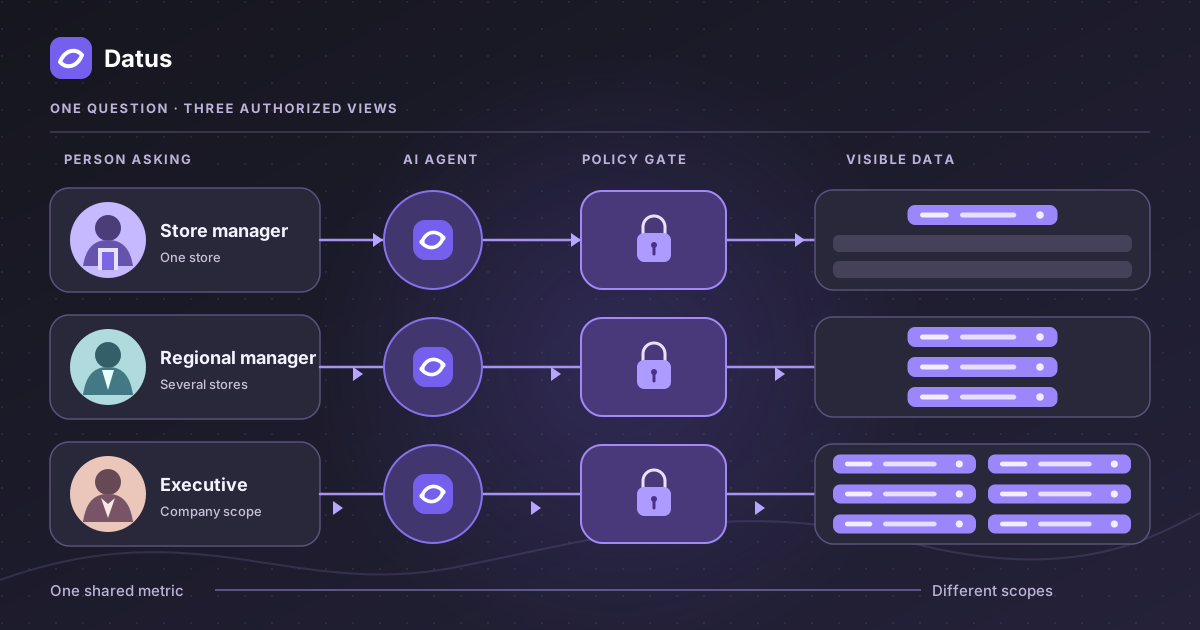
One metric, three permitted views
Imagine a retailer with a reviewed repeat purchase rate metric: customers with a second completed order during the period, divided by eligible customers. That definition should remain consistent across teams. The records included in a calculation can vary by viewer.
| Caller | Authorized scope | The same question should use |
|---|---|---|
| Store manager | Store S101 | Orders and eligible customers from S101 |
| East regional manager | Stores S101, S102, and S103 | Orders and eligible customers from those three stores |
| Company executive | Approved company-wide stores | Orders and eligible customers from the approved company scope |
The diagram below uses fictional store IDs and sample counts to show the implementation sequence. The same reviewed metric is selected for every caller. A trusted service resolves each person’s allowed stores, the row policy limits the source records, and only then does the query calculate the rate.
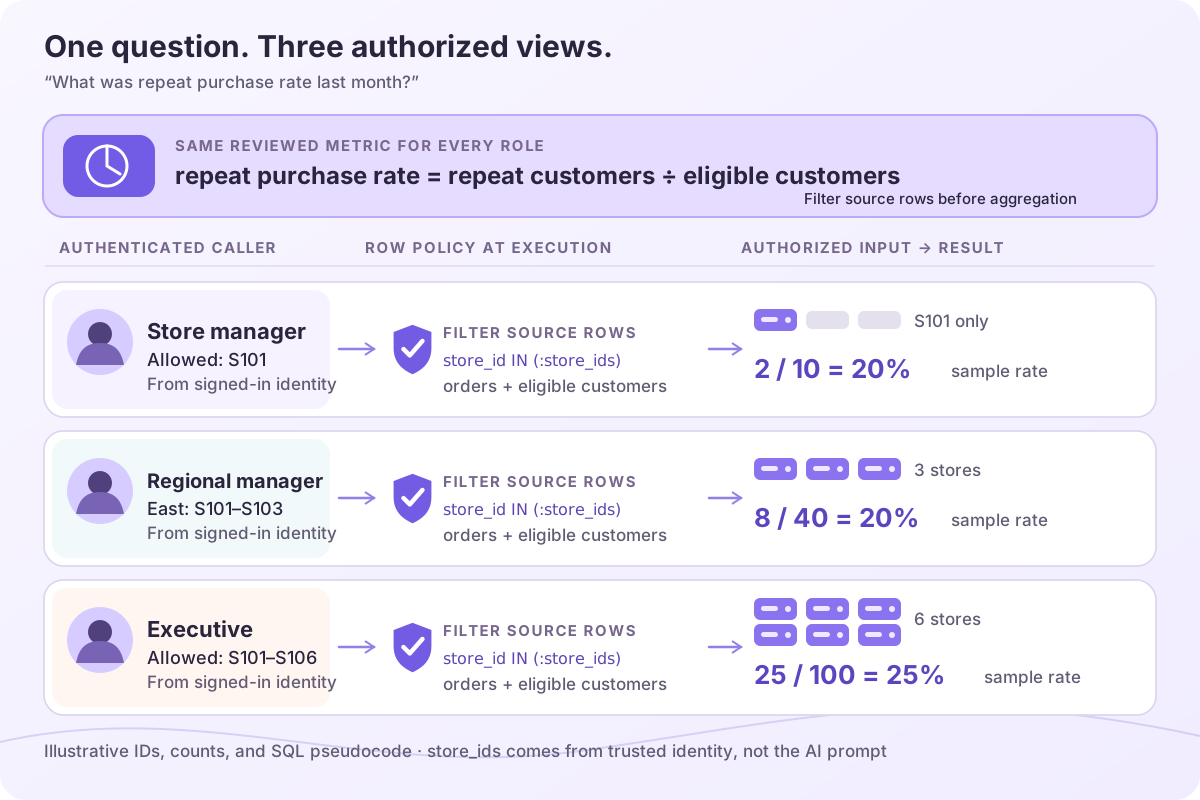
Illustrative values, not product output. Open the diagram to inspect the policy and sample calculation for each role.
The filter has to apply before the numerator and denominator are aggregated. Filtering a finished company-wide percentage by region is impossible; a percentage has no underlying store rows left to remove. Recomputing the metric over the authorized rows preserves both access control and metric meaning.
There is a second question hidden in the example: what makes a customer “eligible” for a regional manager? A customer may buy from an East store and later from a West store. If the denominator counts all customers with a first East purchase but the numerator includes second purchases from any store, the answer can be business-valid for one question and wrong for another. The model needs an approved rule for the metric’s population; business rule validation is a separate step before sharing that definition with agents. RLS then limits which records the caller may read. Security cannot decide the business definition, and a business definition cannot silently expand security scope.
That difference becomes more visible when the agent follows up with “Which customer groups drove the change?” A customer-level breakdown may be permitted for an analyst but inappropriate for a store manager, even if both can see the overall rate. Decide whether the user is authorized for the more detailed grain, not merely whether the top-line KPI was authorized. Aggregation alone is not a universal privacy or permission guarantee.
This is the distinction between a semantic layer and an access policy. The semantic model defines the measure, joins, time dimension, and valid breakdowns. The access policy determines which records this caller may query. Both need to be applied on the same execution path. A consistent metric definition does not, by itself, authorize access to every row behind it.
Follow the identity all the way to the query
An AI analytics request crosses several boundaries. The user signs in to an app, the agent calls tools, a semantic engine may compile a metric into SQL, and a database executes the query. RLS works only if the enforcement point receives a trustworthy identity or scope for this request.
The important handoff is between the application that authenticated the user and the component that executes the read. The application can resolve the user’s allowed stores or tenants and pass that scope through a trusted channel. Alternatively, the database can evaluate its own row policy against the identity used for the query. The model should not be allowed to invent a store ID, remove a filter, or decide that a user deserves a wider scope.
Two things can go wrong even when the SQL looks reasonable:
- A shared service account erases the caller. If every agent query reaches the warehouse as one broadly privileged identity, a database policy tied to
CURRENT_USERmay see the service account rather than the person asking. The application must provide another enforceable per-caller boundary or use a supported identity propagation pattern. - A later tool skips the first check. The first metric call can be scoped correctly while a follow-up raw SQL call, chart query, or cached result uses another path. Inventory every path that can read or display data, including tools exposed through MCP.
Warehouse policies are useful because they apply when queries reach the protected table or view. Snowflake documents row access policies evaluated at query time, and BigQuery documents row-level access policies tied to allowed principals and filter expressions. Their precise behavior and limitations differ, so a team should test its actual warehouse, connection mode, and identity mapping. An agent-side SQL policy can add another gate, particularly when an application has caller attributes that need to travel with the request. For sensitive data, least-privilege source credentials remain important even when an application policy is present.
Choosing an enforcement point
There is no single placement that fits every stack. If the warehouse can evaluate row access using the person’s own identity, a policy on the source table or view can protect both an agent and other consumers that query that object. That is a strong default when the connections actually preserve end-user identity. It may need additional design when a hosted application connects through one service account, when several warehouses participate, or when a tool returns data without going through the protected object.
An application-side query gateway can evaluate the authenticated user’s attributes before the SQL reaches a data source. That can be practical when the application’s groups and store assignments are the authoritative source of access scope. The gateway must mediate every relevant read, and its scope has to be attached by a trusted service rather than supplied by the browser or language model. It also needs to fail closed on malformed policy decisions. Otherwise a new agent tool or direct connection can become an unreviewed path around the gateway.
A third pattern is to expose approved, already scoped datasets to the agent. For instance, a tenant-specific view or a project-specific connection may simplify an initial deployment. Its trade-off is maintenance: each new tenant, source, or metric can require another view or connection. Whatever pattern you choose, map each output to a concrete enforcement point. “The agent has a policy” is too vague; “all reads of marts.orders through this connector use caller-scoped policy X” is testable.
Layered enforcement is often appropriate. The application can restrict which tools and metrics a user may request; the database can still limit the rows reachable by its account or policies. Neither layer should assume the other is infallible. The AWS team’s multi-tenant analytics architecture is one published example of keeping identity verification, semantic validation, and data isolation in separate steps. Its precise implementation is specific to that system; the transferable lesson is to identify which component is responsible for each decision.
Put each control in the right place
The most useful security design question is “What can this component enforce if the agent asks a different question?”
| Control | What it does | What it cannot establish alone |
|---|---|---|
| Project role | Decides who may open a project or use a tool | Which rows that user may see |
| Semantic model | Gives one meaning to a metric and valid dimensions | The caller’s authorization scope |
| Row policy at query execution | Restricts or rejects reads using trusted caller context | Whether a metric definition is business-correct |
| Column permission or masking | Limits exposure of sensitive fields | Which orders or customers a caller may see |
| Audit trail | Records what was requested and enforced | Prevention of a read that was never checked |
RLS and masking are complementary. A store manager may be allowed to see orders from their store while still being barred from customer email addresses. The row filter answers which records; masking or column-level permission answers which fields. BigQuery’s documentation explicitly treats row-level policies and column-level security as separate controls that can coexist.
The boundary also needs an explicit failure mode. If an access attribute is missing, treat the request as denied or ask an administrator to repair the identity mapping. An empty region should not silently mean “all regions.” This matters in an agent flow because an ambiguous answer can hide the fact that a policy was never applied.
Joins, metrics, and multiple sources
A simple store_id filter is easy to picture on an orders table. Real analyses join orders to customers, stores, refunds, and subscriptions. The security review should identify which tables carry the policy key and which relationships can reintroduce out-of-scope data. A join to a lookup table may be harmless if the lookup contains only public labels; a join to customer details may not be. Ask the query engine to show which protected objects it actually queried, and test the resulting rows, not just the generated SQL text.
Cross-source analysis is a harder case. Suppose the agent compares a warehouse metric with data from a support system. A row policy on warehouse.orders says nothing about support tickets retrieved by an API. The support tool needs its own caller-scoped authorization. If an agent merges the two result sets in memory, the combined answer inherits the stricter limits of both sources. This is why evaluating “AI analytics security” by checking one SQL endpoint is incomplete.
Metric definitions also have a version and an owner. If an agent answers yesterday’s question using an older definition, that is a correctness problem; if it answers using rows outside the viewer’s scope, that is an authorization problem. Keep those investigations separate in logs and reviews. A useful trace identifies the caller, metric or query, source, policy decision, and output destination without exposing sensitive attribute values in the trace itself.
The answer is not the only output to protect
AI analytics often produces more than a chat reply. A conversational BI interaction may generate a chart, a dashboard, an HTML report, or a file someone can share. The authorization moment differs for each output.
Live views can query again under the current viewer’s identity. The test is whether opening the same dashboard as an East manager and a West manager recomputes each view under the appropriate scope. A dashboard preview run by its creator is not proof of viewer-level enforcement.
Static reports usually contain results fixed when they were generated. If the author publishes a report with company-wide data, a later reader does not necessarily trigger another row-filtered query. Review the snapshot and its sharing settings before publishing; do not assume a viewer-specific policy will rewrite text already stored in the report.
Exports and caches need their own review. A CSV downloaded by a privileged user is no longer protected by a database query policy after it leaves the system. A cached answer or chart must not be reused across users unless the cache key and access rules preserve their scopes. The same principle applies to the schema, sample rows, and tool results passed into model context: consider whether each is appropriate for the user and the chosen model provider.
The publication workflow should make this distinction visible to the person pressing “Share.” A live, viewer-filtered dashboard can still be unsafe if its embedded static description includes a privileged number. A static report can still be safe for a broad audience if its author intentionally uses public or properly aggregated data. The design question is not whether an output is called a dashboard or report; it is whether each piece of content is queried under the reader’s permissions or copied from an earlier author’s session.
Model context deserves equal attention. An agent may retrieve sample rows to choose a join, then later answer with a correctly filtered metric. The answer is scoped, but those earlier samples have already entered the model request. Minimize the raw data sent to the model, scope retrieval to the caller, and check the data-use settings of the selected provider. A clean final answer cannot undo an overbroad intermediate tool result.
How Datus implements row-level access
Datus separates metric meaning from permission. DOSI supplies a reviewed semantic definition built on the open Apache Ossie standard; Datus Agent uses that definition while answering questions. In Studio, a project-level SQL Policy can use the signed-in caller’s attributes to restrict supported data reads. The policy is configured outside the prompt, so changing the wording of a question does not change the caller’s authorized stores. The Datus security page describes the prerequisites and scope of this control.
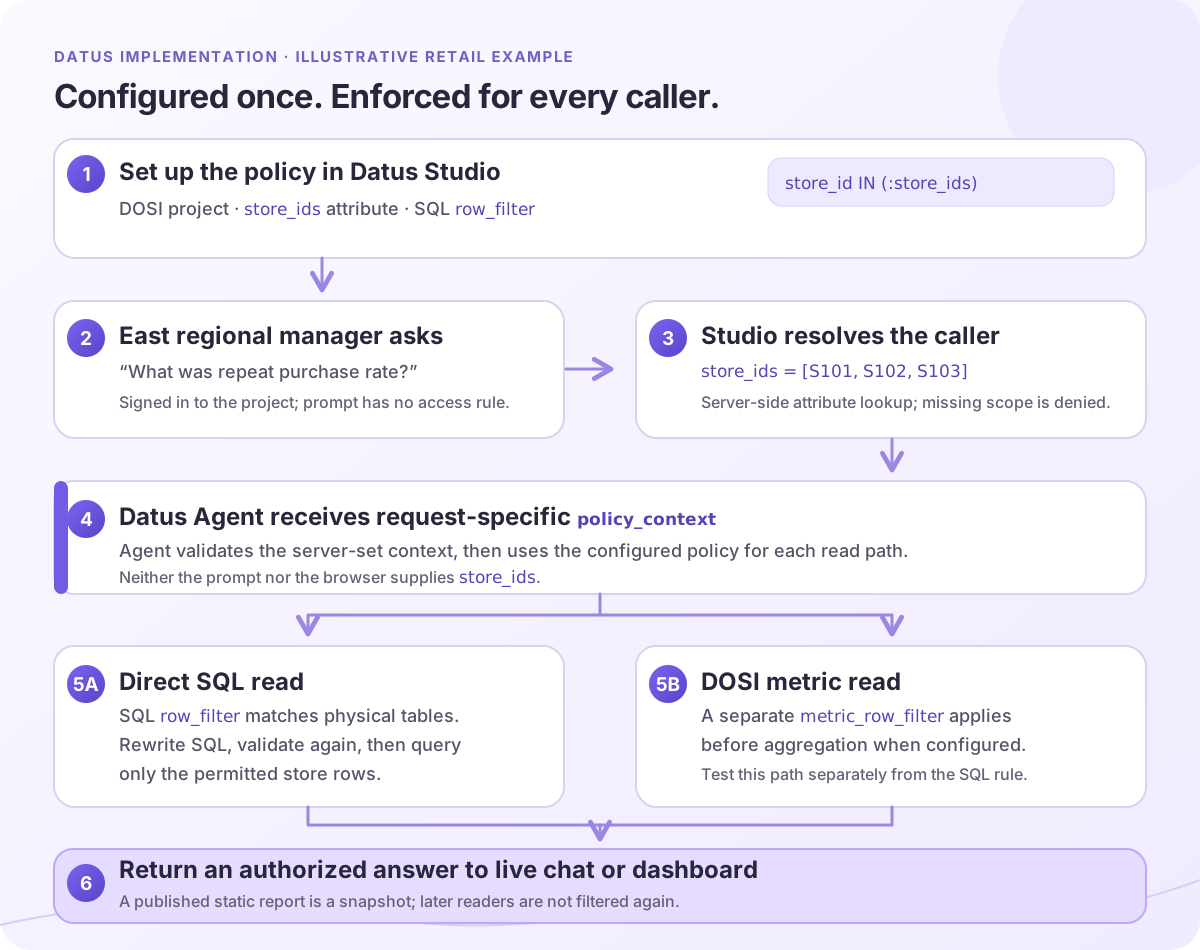
Illustrative flow, not a product screenshot. The SQL and metric policy paths require separate configuration and checks; open the diagram to inspect the steps.
Configure the retailer example in Studio
The following is an illustrative setup, based on the Studio SQL Policy flow; table names and attribute values are examples, not a copy of a deployed Datus project.
- Use a project with the Dosi semantic adapter, confirm an administrator has installed the SQL policy plugin, and mark a user attribute such as
store_idsas a security-policy input. Give the store managerS101, the East regional managerS101throughS103, and the executive the approved company scope. Project access and row scope are separate: a person first needs permission to enter the project. - As a Project Owner or Admin, open Project → SQL Policy → New Policy. For a new policy, choose SQL row_filter, select the relevant data source and physical tables, then set the filter condition to
store_idin thestore_idsattribute. The example must cover every table whose rows contribute to the numerator or denominator. Use the table-scope preview to check that each selected table really hasstore_id; a broad wildcard may catch tables that do not. - In Dry run, choose the store manager as the trial user and click Check. Inspect the rewritten sample SQL and confirm it limits
store_idtoS101. Repeat as the regional manager and a user with nostore_idsvalue. The latter should be denied. A dry run checks the configured scope against catalog metadata and rewrites a sample query; it does not execute and validate every possible production query. - Save as draft while adjusting the rule; a draft does not filter reads. After the checks pass, use Save and enable. Then repeat the same question through the real chat, SQL, dashboard, and metric paths under each test identity. A successful sample rewrite alone is not an end-to-end authorization test.
At request time, Studio resolves the enabled policy and the caller’s attributes on the server, then supplies a request-specific policy_context to Datus Agent. The browser and the model do not get to choose its store_ids values. Missing required attributes or an unresolved conflict in a single-valued attribute cause a denial rather than a wider read. The Agent SQL Policy documentation describes the runtime: it checks the context, validates the original read, runs the policy hook, validates any rewritten SQL, and only then executes the query. The filter is applied to the source rows before the result is returned.
Check metric queries separately. Studio’s new-policy flow creates SQL row_filter rules for direct SQL reads. Existing metric_row_filter rules cover a different path and remain separately manageable; a passed SQL-policy check does not prove a DOSI metric query is scoped. If repeat purchase rate comes through a semantic metric, verify the metric path with both identities and confirm its authorized population before aggregation. Do not infer coverage from the policy name or the diagram above.
The security page also distinguishes live views from static output. A signed-in viewer’s live Subagent or Dashboard read can use that viewer’s scope, while a published Report is a snapshot and is not filtered again for each reader. Anonymous Dashboard and Subagent links stop serving when a row policy is enabled because no caller identity is available. The policy does not cover direct warehouse access or an out-of-process tool that bypasses Agent, and it does not provide column permissions or masking. Keep source credentials least privileged and test each external read path. Datus Agent is open-source; DOSI is source-available under Elastic License 2.0.
A practical RLS test before launch
Use a small, approved dataset with two regional users and one administrator. Give it a reviewed metric and a few deliberately recognizable records. Then test the same prompts and views under each identity.
- Write down the expected scope. Which stores, tenants, tables, and fields should each person access? Include a user with no scope assigned.
- Check the direct read. Can either regional user retrieve another region’s order by ID, through a join, or with an aggregate question? A denied or empty result is different from a plausible but wrong number.
- Check the metric path. Ask for the same measure by region, month, and customer segment. Confirm that the metric uses one definition and filters source rows before aggregation.
- Check every output. Repeat through chat, any MCP-connected agent, live dashboard, report generation, and export. Verify which views requery per viewer and which are snapshots.
- Check failure and change. Remove a user’s access attribute, change their group, and retry. Inspect policy decisions and query logs. An unrecognized identity or missing attribute should not broaden the result.
Keep the expected answers and the test identities as a regression set. Re-run it when you change a model, policy, data-source account, agent tool, or publishing flow. An agent can change how it arrives at SQL; your access invariant should remain the same.
Review the tests with the people who own the data, not only the people building the agent. A regional sales owner can confirm whether the example metric has the intended population. A security owner can confirm that a missing store assignment denies access. A report publisher can confirm what a public link contains. These are different approvals for different risks; a green result in one test does not stand in for the others.
Finally, test repeated questions, not only a single prompt. A user can ask for a total, then ask the agent to narrow that total by a small group or date range. Even when every query obeys RLS, an answer may reveal sensitive facts about people inside the user’s authorized rows. If the data calls for minimum group sizes, output limits, or approval before a detailed extract, specify those separately from the row policy. RLS answers “which records may this caller access?” It does not decide whether a particular summary is safe to share or whether the agent’s interpretation is accurate.
Conclusion
RLS for AI analytics is a property of the request-to-data path. A shared metric can answer the same business question consistently, while a trusted policy limits the records used for each caller. Make the identity handoff explicit, enforce at execution, and test the live and static outputs separately. That gives an agent room to explore without turning a broad credential or a polished answer into an accidental data-sharing channel.
Frequently asked questions
Does a semantic layer automatically provide row-level security?
No. A semantic layer can define a metric and compile queries, but it only enforces RLS if its runtime has a policy mechanism bound to trusted caller context, or its data source applies one. Check the actual execution path. A portable semantic definition is not the same thing as a portable access decision.
Can I put the user’s region in the prompt?
You can include the region to help the agent understand the question, but it must not be the security boundary. The user or model can change prompt text. Resolve the user’s scope from authenticated identity and apply it in a trusted query component or the data source. Test whether an out-of-scope request is denied even when the agent generates SQL without a filter.
Does warehouse RLS still work if the agent uses a service account?
It depends on how the warehouse policy identifies the caller. A policy based on the database login may see only the shared service account. If so, use an appropriate supported per-user identity pattern or a trusted application policy that carries the authorized scope to execution, and keep the source account minimally privileged. Verify with two real test users rather than assuming session identity propagates.
Are published AI reports filtered for every reader?
Not necessarily. A live dashboard may issue a new query for each viewer, while a published report can be a fixed snapshot. Datus’s security page says its static report content is fixed at publication and is not filtered again for each viewer. Review the contents and sharing settings before distributing it.
Is row-level security enough to protect personal information?
No. RLS limits records, while column permissions or masking govern fields such as email or phone number. Exports, model-provider data flows, and published snapshots require separate review. Apply the controls that match the data and the way it leaves the query system.
Related articles
- What is a semantic layer? — the shared metric definition behind the answer
- What is conversational BI? — the interface through which users ask questions
- What is headless BI? — serving the same metrics to more than one consumer
- Enterprise data engineering agents — access, audit, and operating boundaries