
AI Data Pipeline Automation: Use Cases, Architecture, and Tradeoffs
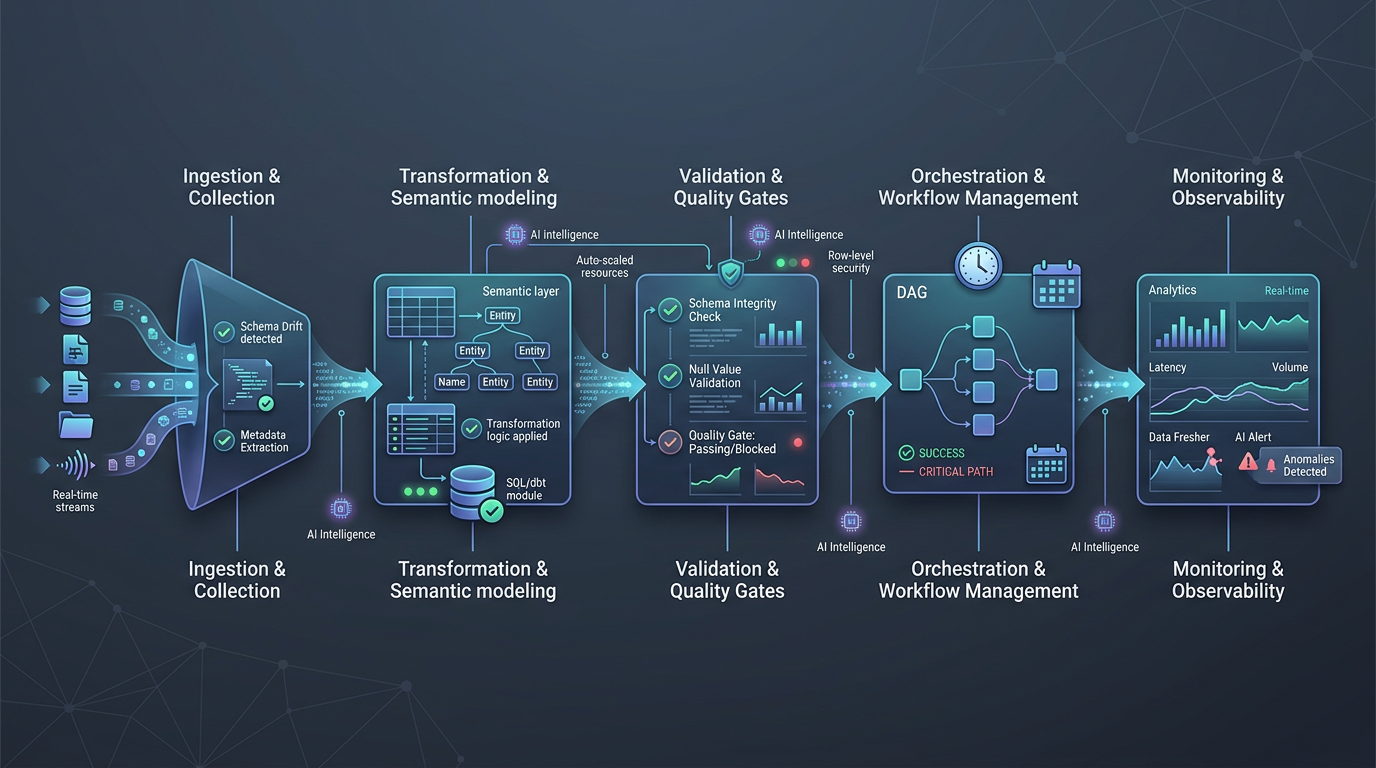
AI data pipeline automation is the use of AI agents and workflow-aware automation to help plan, execute, validate, and improve data pipeline work across the full lifecycle, from development and testing to deployment, monitoring, and documentation.
That definition matters because most teams do not actually need “AI for everything.” They need reliable automation for the parts of pipeline work that are repetitive, context-heavy, and operationally expensive. The hard part is not generating a step. The hard part is connecting intent, data context, business meaning, execution tools, and human review into one system.
This is where many automation efforts break down. Traditional data pipeline automation is good at fixed sequences. It is much weaker when the work depends on changing schemas, semantic definitions, operational history, lineage, or cross-tool coordination. AI data pipeline automation is useful when the system can reason over those inputs and act with guardrails. Without that, it becomes another fragile layer on top of an already complex stack.
For teams building in this direction, Datus frames the problem in a practical way: context, workflow, and execution have to work together. In the Datus docs, that shows up across areas like Quickstart, Workflow, Orchestration, MCP, Metadata, Semantic Models, Metrics, and adapters for the broader data stack. That is a better mental model than treating automation as a prompt attached to a single tool.
The problem with manual and rule-only pipeline automation
Most pipeline work is not just “run job A, then job B.” It includes a long chain of decisions:
- What changed in the source system?
- Which downstream models or dashboards are affected?
- Which metric definitions need to be preserved?
- Is the issue a schema drift problem, a quality problem, or a business logic problem?
- What can be fixed automatically, and what should be escalated?
Teams usually handle those decisions through tribal knowledge, runbooks, ticket threads, and a lot of manual SQL. The result is familiar:
- slow incident response
- brittle handoffs between analytics engineering and platform teams
- duplicated debugging effort
- inconsistent metric logic
- automation that works only in the narrow path it was designed for
Classic orchestration is still necessary. Schedulers, dependency graphs, and batch execution are not going away. But orchestration alone does not understand why a pipeline exists, what a table means, which metric definition is canonical, or whether a change is safe for downstream consumers.
That gap is exactly where AI pipeline automation becomes interesting.
5 use cases where AI data pipeline automation actually helps
The best use cases are not the flashiest ones. They are the places where teams repeatedly combine context lookup, reasoning, and execution.
1. Pipeline triage and root-cause analysis
When a job fails, the first step is rarely the fix. It is figuring out what changed and what matters.
AI data pipeline automation can help by:
- checking recent schema or upstream data changes
- tracing likely downstream impact through lineage
- comparing the current failure to similar historical incidents
- proposing the next debugging steps in the right order
This works well because failure analysis is context-heavy and repetitive. It does not require full autonomy. It requires faster context assembly.
2. SQL generation, review, and optimization in pipeline development
A large share of pipeline work still lives in SQL, model logic, and transformation patterns. AI can help draft queries, suggest rewrites, identify anti-patterns, and review logic before deployment.
This is especially useful when the system has access to:
- table metadata
- historical SQL
- semantic definitions
- reference SQL patterns
- cost and performance constraints
Datus documentation and site content both point to SQL development, SQL review, and reference SQL as part of the workflow surface. That matters because reliable automation in this area depends on more than a text box. It depends on grounded context.
3. Data quality checks and remediation workflows
Teams often know they need better data quality, but the operational work stays manual. Someone sees an alert, opens a warehouse, checks recent changes, writes ad hoc queries, then decides whether to roll back, patch, or annotate.
AI pipeline automation can shorten that loop by:
- identifying which validation rule failed
- tracing the likely source of the anomaly
- generating candidate investigation queries
- routing the issue into the right workflow
- preparing a human-readable summary for review
The point is not to let an agent silently rewrite production tables. The point is to reduce time spent gathering evidence.
4. Metric and semantic model maintenance
One of the most valuable uses of AI in data workflows is not at the raw ingestion layer. It is at the semantic layer.
When business logic changes, teams need to update metric definitions, semantic models, and dependent assets consistently. AI data pipeline automation can help identify where a definition appears, what downstream work is affected, and what needs to be updated together.
This aligns with the Datus docs structure around Semantic Models, Metrics, and even built-in subagent workflows such as generating metrics or semantic models. Again, the important idea is not that the system invents business logic. It is that it can assist in applying governed logic consistently.
5. Documentation, lineage-aware summaries, and deployment readiness
Documentation is one of the first things teams want and one of the last things they maintain. That makes it a strong automation target.
AI can help produce:
- pipeline summaries
- change descriptions
- dependency explanations
- deployment checklists
- lineage-aware release notes
This is particularly effective when the system can connect documentation to actual operational artifacts instead of generating generic summaries after the fact.
What the architecture needs to look like
AI data pipeline automation works best when it is designed as a system, not a feature.
A useful reference architecture has five layers.
1. Context layer
This is the foundation. The system needs access to structured context such as:
- metadata
- schemas
- semantic models
- metrics
- lineage
- historical SQL
- documentation
- prior incidents and workflow outcomes
Without this layer, the AI only sees a local prompt window. With it, the system can reason about the actual environment.
2. Planning and reasoning layer
This layer translates intent into a sequence of actions. It decides whether a task is simple retrieval, a multi-step investigation, a code generation task, or a workflow handoff.
In practice, this is where AI data pipeline automation differs from basic scripts. The system is not just executing a fixed path. It is choosing the path based on context.
3. Tooling and execution layer
This is where the system can actually do something. Examples include:
- warehouse query execution
- workflow orchestration actions
- metadata and semantic layer access
- ticketing or alerting integrations
- documentation and code review steps
The Datus docs surface this clearly through workflow components, orchestration, API, MCP, and adapters. That suggests a tool-using model rather than a chat-only model.
4. Guardrails and governance layer
This is the difference between production automation and a demo.
Guardrails should include:
- scoped tool permissions
- approval requirements for risky actions
- policy checks
- evaluation and logging
- traceability for what was proposed, executed, and changed
If your architecture skips this layer, you are not building reliable automation. You are building operational risk.
5. Human-in-the-loop layer
Not every step should be automated. In many environments, the best design is:
- automate context gathering
- automate draft generation
- automate low-risk actions
- require review for ambiguous or high-impact changes
That is a better operating model than chasing full autonomy too early.
A simple architecture summary
You can think about AI pipeline automation as this chain:
intent → context → reasoning → tools → guardrails → review → execution
If any one of those pieces is weak, the whole system becomes brittle.
The real tradeoffs teams should expect
AI data pipeline automation is not a free speed upgrade. It changes where complexity lives.
Tradeoff 1: Speed vs control
More automation can reduce response time and manual effort. It can also make it easier to propagate mistakes faster if controls are weak.
The right question is not “Can the agent do it?” It is “What level of autonomy is safe for this class of task?”
Tradeoff 2: Flexibility vs predictability
AI systems are more flexible than rule-only automation. They are also harder to reason about if you do not constrain their tools, context, and output format.
Flexible systems need stronger operational design, not looser design.
Tradeoff 3: Local productivity vs system reliability
A single engineer may get immediate productivity gains from AI-generated SQL or automated debugging help. But team-level value depends on whether those gains can be repeated safely across workflows.
That usually requires shared context, standard evaluation, and governance.
Tradeoff 4: Faster delivery vs context maintenance
AI automation performs better when context is current. That means someone has to maintain metadata quality, semantic definitions, workflow standards, and documentation hygiene.
In other words, AI does not remove the need for data discipline. It makes the value of that discipline more visible.
Tradeoff 5: Broad ambition vs narrow production success
Many teams start with a broad goal like “automate the data pipeline.” That is too vague.
The better path is to start with narrow, high-frequency workflows where:
- the context is available
- the tools are clear
- the risk is manageable
- the output can be evaluated
That is how systems become trustworthy.
When this works / when it doesn’t
When this works
AI data pipeline automation works well when:
- the workflow is repetitive but not fully deterministic
- the system has access to structured context, not just prompts
- the actions can be scoped to approved tools
- outputs can be reviewed or evaluated
- there is a clear escalation path to humans
- the team already has some baseline metadata, semantic, and governance discipline
When this doesn’t
It tends to fail when:
- the data environment is undocumented and inconsistent
- metric definitions are unstable or politically contested
- the system has no lineage or semantic awareness
- agents are allowed to execute broad actions without review
- success is measured by demo fluency instead of operational reliability
- the team expects one generic assistant to replace workflow design
That last point is worth being direct about: AI pipeline automation is not just a chatbot added to your warehouse. If it is not grounded in context, workflow, and governance, it will look useful right up until it matters.
Implementation guidance for data teams
If you are evaluating AI pipeline automation, start with a staged approach.
Step 1: pick one bounded workflow
Good starting points include:
- failed job triage
- SQL review
- quality incident investigation
- metric change impact analysis
- documentation generation for pipeline changes
Avoid trying to automate the entire platform on day one.
Step 2: define the context sources
List the systems the automation must read from:
- warehouse metadata
- lineage or catalog systems
- semantic models and metrics
- workflow history
- documentation
- code repositories or SQL history
If this step is fuzzy, the automation layer will stay shallow.
Step 3: define allowed actions
Be explicit about what the system can do automatically versus what requires approval.
For example:
- allowed: generate SQL draft, assemble incident summary, propose dependency analysis
- approval required: change production logic, deploy jobs, modify governed metrics
Step 4: instrument evaluation
Track whether the system actually improves outcomes:
- time to triage
- review time saved
- false positive rate
- successful first-pass fixes
- quality of generated documentation
This is how you avoid mistaking novelty for value.
Step 5: expand only after reliability is proven
Once one workflow is working, add adjacent ones. That is the right time to connect broader workflow orchestration, MCP-based tool access, semantic modeling, and richer execution paths.
Why this matters now
The reason AI data pipeline automation matters now is simple: modern data work already spans too many systems, too much context, and too many handoffs for manual coordination to scale cleanly.
But the winning approach will not be “more AI” in the abstract. It will be better system design around context, semantics, workflows, and execution.
That is the useful lens for evaluating platforms in this category. Datus is a good example of that framing because its docs and product surface point to the pieces that actually matter in practice: contextual data engineering, workflow orchestration, metadata, semantic models, metrics, MCP-based integration, and human-in-the-loop execution.
If you are building toward production-grade automation, that is the bar. Not generation alone. Reliable execution grounded in structured context.
Next steps
- Start with the Datus quickstart and workflow docs
- Then read the supporting article: How to Automate Data Pipelines with AI Agents
- Related reading: 7 High-Impact Data Engineering Agent Use Cases (Powered by Datus)
Related Reading
- Agentic Data Engineering vs Traditional Data Engineering
- What Is a Data Engineering Agent? A Practical Guide with Datus
- Data Engineering Agent Architecture: From Prototype to Production with Datus
- 7 High-Impact Data Engineering Agent Use Cases (Powered by Datus)
Start with Datus
- Studio: Datus Studio Overview
- Docs: Datus Docs
- GitHub: https://github.com/Datus-ai/Datus-agent
- Main site: https://datus.ai