
How MCP Changes Data Workflow Automation
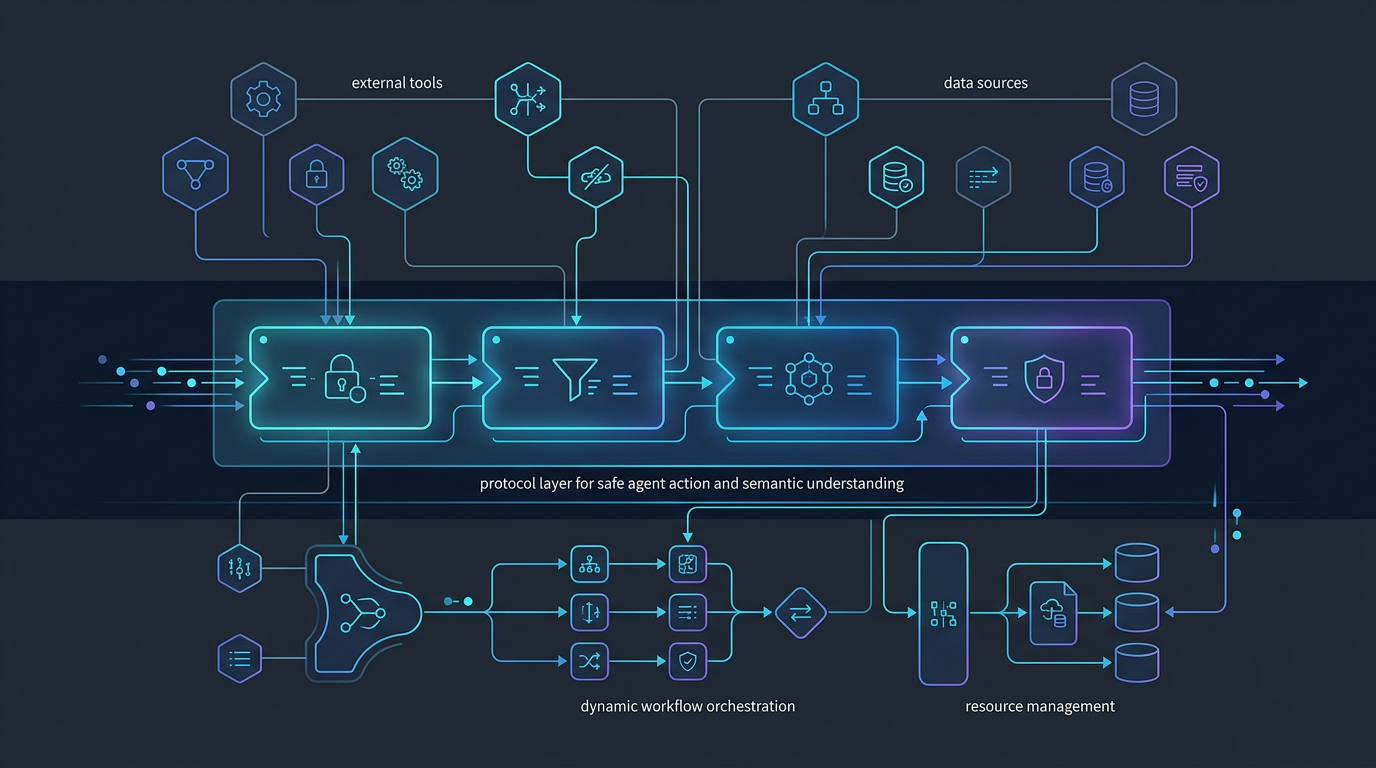
Most AI automation for data work still breaks at the same point: the model can explain a workflow, but it can’t reliably operate one.
That gap matters. Data teams don’t need more impressive demos. They need systems that can move from intent to execution across databases, metrics layers, context stores, and workflow steps without turning every task into a manual relay race.
That is where MCP data workflow automation becomes useful.
MCP gives AI agents a standardized way to connect to tools. In practice, that means an agent is no longer limited to generating text or suggesting SQL. It can discover available tools, call them in a structured way, and work across the systems that make up a real data workflow.
For data teams, the change is not abstract. It affects how agents retrieve context, query systems, trigger workflow steps, and stay grounded in the operational environment around the data.
What is MCP?
Model Context Protocol (MCP) is a protocol for connecting AI agents to external tools and systems through a consistent interface.
Instead of hardcoding every integration into the agent itself, MCP lets a client connect to tool servers that expose specific capabilities. Those capabilities can include database access, semantic-layer queries, filesystem operations, or custom actions defined by the team.
A simpler way to think about it:
- prompts tell the model what you want
- context tells the model what it should understand
- MCP tells the model what it can do
That distinction is what makes MCP relevant to workflow automation.
Without tool access, an agent can describe a pipeline issue, draft SQL, or recommend next steps. With tool access, the agent can participate in the workflow itself.
According to the Datus docs, MCP is how Datus CLI connects to external tool servers, allowing the agent to gain capabilities beyond what is built in. Datus documents support for local or remote MCP servers over stdio, HTTP, and SSE, along with direct tool calls and server-level filtering. Datus also exposes a dedicated MCP server so external MCP-compatible clients can access Datus database and context search tools.
Why MCP matters for data workflow automation
Data workflow automation is usually limited by three problems:
- the agent lacks the right tools
- the tools are available but not exposed in a consistent way
- execution happens without enough control, context, or visibility
MCP improves the first two directly, and it creates a better foundation for the third.
1. It turns agents from answer generators into workflow participants
Traditional AI usage in data work often stops at recommendation:
- generate SQL
- explain schema
- summarize a dashboard issue
- propose a fix
Useful, but incomplete.
A workflow participant can do more:
- inspect available systems
- query a semantic or metrics service
- read a file or artifact needed for the task
- trigger the next step in a workflow
- pass structured results into another tool
This is the shift from chat-based assistance to tooling for AI agents.
In Datus’s docs, that pattern shows up clearly. The platform includes workflow concepts, nodes, orchestration, subagents, knowledge-base assets, and MCP integration. That matters because workflow automation is not just about one tool call. It is about connecting reasoning to a sequence of actions.
2. It reduces custom integration sprawl
Most teams exploring agentic automation end up rebuilding the same glue code over and over:
- one custom adapter for the warehouse
- another for metrics
- another for file access
- another for internal APIs
- more wrappers for auth and transport
That approach does not scale well. It fragments execution logic and makes it harder to reason about what an agent can actually access.
MCP gives teams a more standard integration surface.
Datus’s MCP extension docs describe exactly this kind of extensibility. The CLI can add local or remote MCP servers, list them, check connectivity, call tools directly, and filter which tools are included or excluded. The result is a cleaner operating model: instead of baking every capability into the core agent, teams can attach capabilities as needed.
3. It makes workflow composition more practical
Data work is almost never one step.
A realistic workflow might require an agent to:
- inspect metadata or prior context
- identify the right tables or metrics
- generate or refine SQL
- run the query
- validate the output
- hand the result into another process
That is much closer to how Datus describes workflows in its docs: workflows are built from specialized nodes such as schema linking, SQL generation, SQL execution, reflection, and output.
MCP complements that model because it gives agents a standard way to reach the external tools that support those steps.
4. It creates a better path for governed automation
More tool access does not automatically mean better automation. Uncontrolled tool access can create new failure modes.
What matters is structured, filtered, auditable capability.
This is one reason MCP extensions are strategically important. Datus documents explicit tool filtering, server checks, and different transport modes for different environments. Those are not minor implementation details. They are part of what makes AI execution safer in production.
For data teams, governed automation usually means:
- limiting what tools an agent can call
- constraining write access
- separating local development from remote services
- knowing which server exposed which capability
- making context and execution paths inspectable
MCP does not solve governance by itself, but it gives teams a cleaner surface on which to apply it.
How MCP changes workflow outcomes, not just architecture
The easiest mistake in writing about MCP is to stop at the protocol layer.
The more useful question is: what changes in actual data work?
Here are the practical outcomes.
Scenario: from “write me SQL” to “help me resolve the issue”
A prompt-only system can draft a query. A tool-connected agent can inspect the context around the issue.
That may include:
- checking metadata
- reviewing reference SQL
- querying a metrics service
- reading workflow artifacts
- running a validation step before returning a result
This is the difference between an isolated answer and a workflow-aware response.
Scenario: from single-system reasoning to cross-system execution
Data workflow problems often span multiple systems. The agent may need information from a warehouse, semantic layer, filesystem, and orchestration layer before it can act responsibly.
MCP gives the agent a standard path to interact with those systems through exposed tools instead of treating each one as a one-off integration.
That is especially relevant for Datus’s positioning around contextual data engineering. The docs describe a system built around reusable context such as metadata, semantic models, metrics, reference SQL, and scoped subagent context. MCP helps connect that context to execution.
Scenario: from generic automation to domain-scoped automation
Not every workflow should expose the same toolset.
A finance-reporting agent, a semantic-modeling agent, and a pipeline-debugging agent should not all operate with the same permissions or the same capabilities.
Datus’s docs describe scoped subagents and configurable tools per scenario. MCP fits that model well because capabilities can be assembled around the use case instead of flattened into one monolithic assistant.
That leads to better automation outcomes:
- fewer irrelevant tool choices
- tighter domain behavior
- clearer guardrails
- easier evaluation of whether the agent is acting correctly
Examples of MCP in data engineering workflows
Example 1: A metrics-aware troubleshooting workflow
A stakeholder asks why weekly revenue dropped.
A basic assistant might produce a guess or write exploratory SQL.
An MCP-enabled workflow can be more disciplined:
- call a metrics tool to inspect the governed definition
- query underlying data sources
- review reference SQL or prior context
- compare current results with historical patterns
- hand findings back with evidence
That does not remove the need for human review. It reduces the manual context switching required to start the investigation well.
Example 2: A semantic-layer-first analytics workflow
A team wants agents to answer business questions using governed metrics instead of ad hoc column guesses.
Datus’s docs show MetricFlow integration as an MCP extension example, including listing metrics and querying them with dimensions. That is important because it moves the workflow away from “generate some SQL and hope it matches business definitions” toward “use the metric interface designed for the job.”
The workflow outcome is better consistency, not just more speed.
Example 3: A local-to-remote tool chain for engineering tasks
Datus documents MCP server support over stdio, HTTP, and SSE, plus static and dynamic server modes for namespaces. That flexibility is useful for real engineering workflows.
A team might:
- use local stdio-based tools in development
- expose HTTP or SSE services for shared environments
- map capabilities by namespace or scenario
- add only the tools a given workflow needs
That is a more production-minded model than giving one general assistant broad, poorly scoped access.
What MCP does not solve on its own
MCP is important, but it is not the whole answer.
A tool-connected agent can still fail if it lacks:
- semantic context
- business definitions
- lineage awareness
- workflow structure
- evaluation and feedback loops
- human-in-the-loop control where it matters
This is where Datus has a stronger strategic story than “we support MCP.” The docs position Datus around contextual data engineering, workflow orchestration, subagents, semantic models, metrics, and long-term context. MCP matters because it connects those assets to execution. It is valuable as part of a system, not as a standalone badge.
A practical framework for evaluating MCP data workflow automation
If you are evaluating MCP for a data engineering environment, ask four questions:
1. What tools should the agent actually have?
Not every workflow needs full-system reach. Start with the smallest useful capability set.
2. What context grounds those tool calls?
Tool access without semantic context is still brittle.
3. What workflow structure wraps the execution?
A good agent does not just call tools. It follows a workflow with checks, reflection, and handoffs.
4. What guardrails exist around the tool surface?
Look for filtering, scoped access, auditable configuration, and clear separation between environments.
The strategic takeaway
MCP changes data workflow automation because it gives AI agents a cleaner path from reasoning to action.
That sounds simple, but the implications are real. Once agents can connect to structured tool surfaces instead of operating as text-only systems, automation becomes less about one-off answers and more about coordinated workflow execution.
For data teams, that means better building blocks for:
- context-aware investigation
- semantic-driven analytics workflows
- domain-scoped subagents
- governed tool access
- multi-step execution across systems
The important caveat is that MCP works best when it is paired with structured context and workflow design. Tool access alone is not enough. But without tool access, most AI automation stays shallow.
That is why MCP matters now. It does not make data workflow automation effortless. It makes it operationally possible.
Continue exploring
- Read the docs: MCP docs
- Explore MCP extensions: MCP extensions
- See workflow concepts: Workflow introduction
- Read about contextual data engineering: Contextual Data Engineering
Related Reading
- AI Data Pipeline Automation: Use Cases, Architecture, and Tradeoffs
- Agentic Data Engineering vs Traditional Data Engineering
- What Is a Data Engineering Agent? A Practical Guide with Datus
- Data Engineering Agent Architecture: From Prototype to Production with Datus
Start with Datus
- MCP docs: MCP docs
- MCP extensions: MCP extensions
- GitHub: https://github.com/Datus-ai/Datus-agent
- Main site: https://datus.ai